

Introduction
Running in Postman the entire full Flowize API

Flowize provides a whole set of tools to simplify the injection of data implementing RESTful & Soap Web Service APIs.
SOAP-based web service in Flowize:
<soapenv:Envelope
xmlns:xsi="http://www.w3.org/2001/XMLSchema-instance"
xmlns:xsd="http://www.w3.org/2001/XMLSchema"
xmlns:soapenv="http://schemas.xmlsoap.org/soap/envelope/"
xmlns:dig="Flowize">
   <soapenv:Header/>
   <soapenv:Body>
      <mym:postRecord soapenv:encodingStyle="http://schemas.xmlsoap.org/soap/encoding/">
         <input xsi:type="mym:postRecord">
            <!--You may enter the following 2 items in any order-->
            <soapenv:Header>
              <tns:AuthenticationHeader>
                  <SessionID xsi:type="xsd:string">**session_id**</SessionID>
              </tns:AuthenticationHeader>
            </soapenv:Header>
            <Customer xsi:type="mym:CustomerObject">
               <!--You may enter the following 6 items in any order-->
               <Postcode xsi:type="xsd:string">?</Postcode>
               <Huisnummer xsi:type="xsd:string">?</Huisnummer>
               <Toevoeging xsi:type="xsd:string">?</Toevoeging>
               ... More input fields
               <brief_naw_02 xsi:type="xsd:string">?</brief_naw_02>
               <brief_naw_03 xsi:type="xsd:string">?</brief_naw_03>
               ...

            </Customer>
         </input>
      </mym:postRecord>
   </soapenv:Body>
</soapenv:Envelope>
SOAP message response will be like:
<soapenv:Envelope
xmlns:xsi="http://www.w3.org/2001/XMLSchema-instance"
xmlns:xsd="http://www.w3.org/2001/XMLSchema"
xmlns:soapenv="http://schemas.xmlsoap.org/soap/envelope/"
xmlns:dig="Flowize">
   <soapenv:Body>
      <mym:postRecordResponse>
         <return xsi:type="mym:postRecordResponse">
            <Result xsi:type="xsd:string">SUCCESS</Result>
            <DataRecordID xsi:type="xsd:string">123</DataRecordID>
            <Message xsi:type="xsd:string">Data Record created successfully</Message>
         </return>
      </mym:postRecordResponse>
   </soapenv:Body>
</soapenv:Envelope>
Flowize provides programmatic access to your organization’s information using simple, powerful, and secure application programming interfaces. To use this document, you should have a basic familiarity with software development, Web services, and the Flowize user interface.
Any functionality described in this guide is available if your organization has the API feature enabled.
In particular, Flowize supports the following features about RESTful APIs:
- Quick prototyping with support for common APIs for Active Record;
- Response format negotiation (supporting JSON and XML by default);
- Customizable object serialization with support for selectable output fields;
- Proper formatting of collection data and validation errors;
- Efficient routing with proper HTTP verb check;
- Built-in support for the OPTIONS and HEAD verbs;
- Authentication and authorization;
- Data caching and HTTP caching;
SOAP is another kind of web services that Flowize uses:
A SOAP-based web service in Flowize involves the sending of an XML message such as shown in the code below:
A SOAP message is an ordinary XML document containing the following elements:
- An Envelope element that identifies the XML document as a SOAP message
- A Header element that contains header information
- A Body element that contains call and response information
- A Fault element containing errors and status information
All the elements above are declared in the default namespace for the SOAP envelope:
http://www.w3.org/2003/05/soap-envelope/
and the default namespace for SOAP encoding and data types is:
http://www.w3.org/2003/05/soap-encoding
Requests
A request in Flowize API is a petition to our server for retrieving information. Any Requests may be made using the HTTPS protocol. The protocol interface contains different method such as:
| Method name | Usage |
|---|---|
DELETE |
DELETE is used to destroy information from Flowize. the DELETE method should be used. |
GET |
GET is the simplest type of HTTP request method. It's used for Retrieve information related to an action. Data should never be modified on the server side as a result of a GET. the GET method should be used. request. |
HEAD |
HEAD is used when we want to check metadata information. the HEAD method should be used to get the headers. |
POST |
POST is used when we are creating a new resource in a collection. the POST method should be used. |
PUT |
PUT is used when we want to update the resource identified by the URL. the PUT method should be used. |
HTTP Statuses
Flowize API responds always with a valid and standard HTTP status code. The status code can be success or include errors code.
Example Success response: HTTP/1.1 201 Created
{
  "resource": {
    "creation_date": "2016-05-03 11:47:38",
    "modified_date": "2016-05-03 11:47:38"
  },
  "message": "Schema structure is created successfully"
}
Flowize uses conventional HTTP response codes to indicate the success or failure of an API request. In general, codes in the 2xx range indicate success, codes in the 4xx range indicate an error that failed given the information provided (e.g., a required parameter was omitted, error in the authentication, etc.), and codes in the 5xx range indicate an error with Flowize 's servers.
| Code | Description |
|---|---|
200 - OK |
Everything worked correctly. |
201 - Created |
It was created as expected. |
400 - Bad Request |
The request was unacceptable, often due to missing a required parameter. |
401 - Unauthorized |
Authentication is missing or invalid, including an invalid or expired bearer token. |
402 - Request Failed |
The parameters were valid but the request failed. |
403 - Forbidden |
Access is forbidden, for example because of an IP restriction or insufficient permissions. |
404 - Not Found |
The requested resource doesn't exist. |
408 - Request Timeout |
The client did not produce a request within the time that the server was prepared to wait. Try later. |
409 - Conflict |
The request conflicts with another request (maybe due to using the same key). |
429 - Too Many Requests |
Too many requests hit the API too quickly. |
500, 502,503,504 - Server Errors |
We had a problem with our server. Try again later. |
Responses
Token response: HTTP/1.1 200 OK
{
  "access_token": "ACCESS_TOKEN",
  "token_type": "Bearer",
  "expires_in": 3600
}
API responses use JSON, except for requests such as HEAD that have no response body. The structure depends on the endpoint. The OAuth2 token endpoint returns the plain object shown here; resource endpoints retain their documented response structure.
Rate Limit
Example Rate Limiting headers
X-RateLimit-Limit: 1000
X-RateLimit-Remaining: 989
X-RateLimit-Reset: 2173
Example Rate Limiting response: HTTP/1.1 429 Too many requests
{
  "resource": [],
  "error": {
    "code": 429,
    "message": "Too many requests."
  }
}
To prevent abuse, it is standard practice to add some sort of rate limiting to an API. RFC 6585 introduced a HTTP status code 429 Too Many Requests to accommodate this.
However, it can be very useful to notify the consumer of their limits before they actually hit it. This is an area that currently lacks standards but has a number of popular conventions using HTTP response headers.
At a minimum, include the following headers (using Twitter's naming conventions as headers typically don't have mid-word capitalization):
X-Rate-Limit-Limit- The number of allowed requests in the current period.X-Rate-Limit-Remaining- The number of remaining requests in the current period.X-Rate-Limit-Reset- The number of seconds left in the current period.
ETag
HTTP/1.1 200 OK
Content-Type: application/json;
Expires: Thu, 19 Nov 1981 08:52:00 GMT
Pragma: no-cache
ETag: "8bfb3ec0848ea5a05f5107e49ff7e8f2"
HTTP/1.1 200 OK
Content-Type: application/json;
Expires: Thu, 19 Nov 1981 08:52:00 GMT
Pragma: no-cache
If-None-Match: "8bfb3ec0848ea5a05f5107e49ff7e8f2"
HTTP/1.1 304 Not Modified
Content-Type: application/json;
Expires: Thu, 19 Nov 1981 08:52:00 GMT
Pragma: no-cache
Content-Length: 0
If you are caching resources (API responses) for sufficiently long periods of time (hours, days, potentially months) you usually do not have to worry about the issues related to date-time-based caching, which were described in the previous section.
For facilitating caching of near-static data, where we have no reliable clue about when data will become stale but we know it won’t happen too soon and yet it will happen, you could use two approaches:
- Entity Tags (ETags) that don’t rely on shared agreement on time.
- The Last-Modified HTTP header, which is date-time-centric.
Once the client receives the response and sees the ETag value, it should save the ETag and the response in the local store and issue subsequent requests to the same data with the If-None-Match header that points to the value of the ETag saved.
If the data-set hasn’t modified on the server, the server must respond with HTTP 304 and an empty body.
Using Last-Modified
HTTP/1.1 200 OK
Content-Type: application/json;
Last-Modified: Thu, 19 Nov 1981 08:52:00 GMT
Pragma: no-cache
Content-Length: 15608
In this workflow, for each response, the server provides a “Last-Modified” header in the response, containing the last date the specific data was modified.
If the data-set has modified on the server, the server must respond with a full HTTP 200 response and the new value of ETag.
Once the client receives the response and sees the Last-Modified header, it should save the value of the Last-Modified date-time and the corresponding response in the local store (cache).
API Key authorization
There are some cases where Customer has got an internal configuration and it can't implement OAuth 2 implementation. On that cases, Flowize provides another communication method using the API key generated in the customer section. This API key is unique per customer and it hasn't an expiration date. So all the transaction in the API will be done without an expiration time.
To use the API key authorization when we are creating an application inside the platform it will be necessary to switch off OAuth 2 option.
URL authorization
URL Request
Example Request:
$ curl -X GET "https://cloud-api.flowize.com/v1/record?api_key={{api_key}}&app_key={{app_key}}&flow_name={{flow_name}}&scopes={{scopes}}&uuid={{uuid}}&realtime={{executiontime}}"
-H "Content-Type: application/json"
-H "Cache-Control: no-cache"
There is some cases when a customer can't modified HTTP header that he needs to pass all parameters by GET. On that case, Flowize provides a Security private network to pass all these variables on the GET url.
OAuth 2.0
OAuth2 authenticates server-to-server integrations using the client credentials grant. Each interface has its own client ID and client secret in its project. There is no browser login or authorization redirect.
Enable OAuth2 for an interface
- Open the project and select Interfaces, then your interface.
- In Interface details > Interface security, choose Yes, secure API.
- Set OAuth2 to Enabled and save.
- Copy the token endpoint shown in the interface. It includes the API host and
current_project_idfor that project.
Save a new interface before requesting credentials. Enabling OAuth2 changes how clients authenticate to this interface; update your integration accordingly.
View and regenerate credentials
Use Show credentials and confirm your user password to reveal the client ID and client secret. This requires permission to save the interface. Credentials are fetched only after authorization, rather than included in the initial page.
Use the copy controls to transfer credentials to your server's secret storage. The interface hides them after 60 seconds, when you hide them manually, or when you leave the page or tab. Keep secrets and access tokens out of browser applications, URLs, source control, and logs. Use HTTPS.
Regenerate credentials also requires password confirmation. It takes effect immediately: the old client ID, secret, and access token stop working. Copy the new credentials, update your integration, and request a new token. No additional Save is needed for regeneration.
Disabling OAuth2 or interface security invalidates the stored access token when saved.
Request an access token
Form credentials
curl --request POST 'https://cloud-api.flowize.com/v1/token?current_project_id=123' \
  --header 'Content-Type: application/x-www-form-urlencoded' \
  --data-urlencode 'grant_type=client_credentials' \
  --data-urlencode 'client_id=CLIENT_ID' \
  --data-urlencode 'client_secret=CLIENT_SECRET'
Alternative: HTTP Basic credentials
curl --request POST 'https://cloud-api.flowize.com/v1/token?current_project_id=123' \
  --user 'CLIENT_ID:CLIENT_SECRET' \
  --header 'Content-Type: application/x-www-form-urlencoded' \
  --data-urlencode 'grant_type=client_credentials'
HTTP 200 OK
{
  "access_token": "ACCESS_TOKEN",
  "token_type": "Bearer",
  "expires_in": 3600
}
Send POST /v1/token with an application/x-www-form-urlencoded body. Replace the example host, project ID, and credentials with those from your interface.
| Parameter | Location | Required | Description |
|---|---|---|---|
current_project_id |
Query string | Yes | Positive numeric project ID. Selects the database containing the interface credentials. |
grant_type |
Form body | Yes | Must be client_credentials. |
client_id |
Form body or HTTP Basic | Yes | Client ID of the enabled interface. |
client_secret |
Form body or HTTP Basic | Yes | Client secret of the same interface. |
scope |
Form body | No | Accepted and ignored. It does not change permissions. |
Use exactly one credential method: form fields or HTTP Basic. Supplying both returns an error. For HTTP Basic, form-URL-encode each credential before joining them with a colon and Base64-encoding the result; the generated hexadecimal credentials need no special encoding.
The response is a plain JSON object, without a resource wrapper. expires_in is the lifetime in seconds: 3600 seconds (one hour). No refresh token or scope is returned. Token responses use Cache-Control: no-store and Pragma: no-cache.
The project must be active, OAuth2 must be enabled on the interface, and the request must satisfy its IP restrictions and the project's API subscription.
Use the bearer token
Example: retrieve a record (replace RECORD_UUID)
curl 'https://cloud-api.flowize.com/v1/record?current_project_id=123' \
  --header 'Authorization: Bearer ACCESS_TOKEN' \
  --header 'Content-Type: application/json' \
  --header 'X-Uuid: RECORD_UUID'
Include Authorization: Bearer ACCESS_TOKEN on API requests that support OAuth2. Regular REST requests must also include the same current_project_id in the query string. Supply any other headers and parameters required by the endpoint.
Direct URLs (/v1/directurl/INTERFACE_CODE) resolve the project from the interface code, so the project query parameter is optional there. If supplied, it must match. The token must belong to that specific interface.
Missing, invalid, or expired bearer tokens are rejected. OAuth2 does not replace endpoint-specific permissions or enable bearer authentication on endpoints that require API keys. No scope parameter or X-Scopes header is required for OAuth2 authentication.
Renew an access token
Repeat the same POST /v1/token request with your client credentials before the token expires. There is no refresh-token grant.
Each successful token request replaces the previous access token for that interface immediately. Reuse the current token until renewal is needed. Coordinate renewal if multiple processes share the same interface, so they do not invalidate each other's tokens.
Credential regeneration and disabling OAuth2 also invalidate the current token. After regeneration, request a token using the new credentials.
Token errors
Example: HTTP 401 Unauthorized
{
  "error": "invalid_client"
}
| HTTP status | Error | Meaning |
|---|---|---|
| 400 | invalid_request |
Invalid or missing project ID, incorrect body content type, or mixed credential methods. |
| 400 | unsupported_grant_type |
grant_type is missing or is not client_credentials. |
| 401 | invalid_client |
Missing or incorrect credentials, unavailable project, disabled OAuth2, or failed IP/subscription checks. |
| 500 | server_error |
The server could not issue a token. |
| 503 | temporarily_unavailable |
Token issuance is temporarily unavailable, including throttling. |
Check project selection and credentials for authentication failures. Do not retry invalid credentials indefinitely. For temporary failures, retry with a delay.
RESTful
Flowize uses REST, or in the full form, Representational State Transfer has become the standard design architecture for developing web APIs. At its heart REST is a stateless client-server relationship; this means that unlike many other approaches there is no client context being stored server side (no Sessions). To counteract that, each request contains all the information necessary for the server to authenticate the user, and any session state data that must be sent as well.
REST takes advantage of the HTTP request methods to layer itself into the existing HTTP architecture. These operations consist of the following:
- GET - Used for basic read requests to the server
- PUT - Used to modify an existing object on the server
- POST - Used to create a new object on the server
- DELETE - Used to remove an object on the server
By creating URI endpoints that utilize these operations, a RESTful API is quickly assembled.
All methods in the API should follow the flow diagram below:
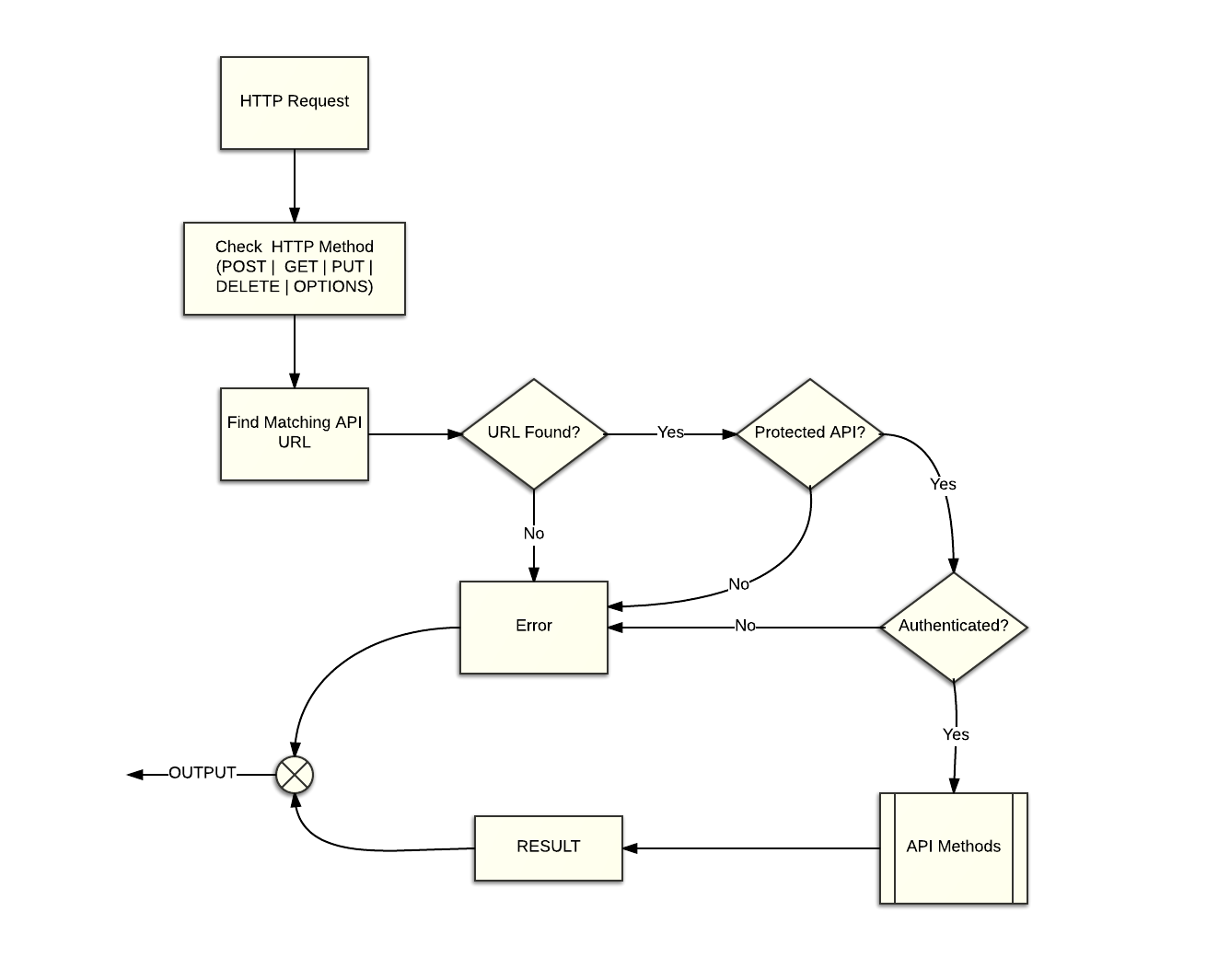
Picture 1: RESTful API
Endpoints API Methods
The API uses the following list:
| HTTP Method | Endpoint | Usage | Returns |
|---|---|---|---|
POST |
/v1/token | Issue an OAuth2 access token. | access_token |
POST |
/v1/schema |
Inserts a Data Schema structure per customer. | schema |
GET |
/v1/schema |
Gets the Data Schema Structure. | schema |
PUT |
/v1/schema |
Updates the customer Data Schema. | schema |
DELETE |
/v1/schema |
Removes the customer Data Schema. | schema id |
GET |
/v1/record/:id |
Gets a Record Data with identifier :id. | record |
POST |
/v1/record |
Inserts a Data Record structure. | record |
PUT |
/v1/record |
Updates a Data Record with identifier :id. | record |
DELETE |
/v1/record |
Removes a Data Record with identifier :id. | record id |
PUT |
/v1/record/search |
Search your data records by different query parameters. | record array |
PUT |
/v1/record/movetoflow |
Move one or more data records to another flow. | record array |
PUT |
/v1/record/changestatus |
Change the status of a record in the queue. | record array |
POST |
/v1/webhook |
Inserts Data using a Webhook Protocol. | webhook |
GET |
/v1/flowdiagram |
Gets information related to a Flow Diagram. | flowdiagram |
PUT |
/v1/changeflowstatus |
Updates the flow status | changeflowstatus |
GET |
/v1/keystore |
Gets the data saved in the keystore_id with the given keystore_key | keystore_data |
POST |
/v1/keystore |
Inserts data in the keystore_id with the given keystore_key | keystore_data |
PUT |
/v1/keystore |
Inserts/Update data in the keystore_id with the given keystore_key | keystore_data |
DELETE |
/v1/keystore |
Deletes data in the keystore_id with the given keystore_key | json |
POST |
/v1/keystore |
Search for data in the keystore identifier | keystore_data array |
GET |
/v1/tables |
Gets the data saved in one of your Tables given the table_name and a numeric ID | table_data |
POST |
/v1/tables |
Inserts a new data row in a Table | json |
PUT |
/v1/tables |
Updates data in a Table with with a given ID | json |
DELETE |
/v1/tables |
Deletes the given ID from a Table | json |
POST |
/v1/tables |
Search for data in a Table | table_data array |
GET |
/v1/environment |
Gets list of the Environments of the Organization | environment_data array |
GET |
/v1/environment/:id |
Gets an Environments by ID | environment_data |
GET |
/v1/environment/:id/status |
Retrieves the status of the server | json |
POST |
/v1/environment |
Creates a new Environment in the organization | json |
POST |
/v1/environment/:id |
Updates some information of the Environment like the name, description, SSL certificates | json |
DELETE |
/v1/environment/:id |
Deletes an Environment | json |
POST |
/v1/environment/:id/upgrade |
Upgrades the Environment to a new package or increases its storage | json |
POST |
/v1/environment/:id/update-version |
Updates the Environment to the latest version | json |
POST |
/v1/environment/:id/optimize |
Optimizes the storage of the Environment | json |
GET |
/v1/environment/:id/projects |
Outputs information about the Projects that are currently hosted in the Environment | project_data array |
POST |
/v1/environment/:id/project/:project_id |
Adds/Updates the Project {project_id} to the Environment if it does not exist. | json |
DELETE |
/v1/environment/:id/project/:project_id |
Deletes Project from an Environment | json |
curl -X GET -G 'https://cloud-api.flowize.com/v1/record/search' \
REST authentication
Token endpoint
POST https://cloud-api.flowize.com/v1/token?current_project_id=PROJECT_ID
Use the OAuth2 client credentials grant with an application/x-www-form-urlencoded body. Provide grant_type=client_credentials and authenticate with either form credentials (client_id, client_secret) or HTTP Basic.
The response contains access_token, token_type, and expires_in at the top level. Tokens last one hour; requesting another token immediately replaces the current one. Renew by repeating the token request. No refresh token is issued. An optional scope is ignored.
See OAuth 2.0 for interface setup, credential management, request examples, and errors.
For resource requests supporting OAuth2, send Authorization: Bearer ACCESS_TOKEN and the same current_project_id query parameter. Direct URLs resolve the project from their interface code. Other endpoint headers and permissions still apply.
Data Schema
Create new Schema
Insert the customer Data Schema.
HTTP Request using oAuth2:
$ curl -X POST "https://cloud-api.flowize.com/v1/schema"
-H "Content-Type: application/json"
-H "grant_type: client_credentials"
-H "Authorization: Bearer {{access_token}}"
-H "X-Scopes: schema"
-H "Cache-Control: no-cache"
-d '{
    "schema" : "base64({{schema}})",
    "data_record": "base64({{data_record}})",
    "url": "www.example.nl"
}'
HTTP Request using Headers no oAuth2:
$ curl -X POST "https://cloud-api.flowize.com/v1/schema"
-H "Content-Type: application/json"
-H "X-Apikey: {{api_key}}"
-H "X-App: {{app_key}}"
-H "X-Scopes: schema"
-H "Cache-Control: no-cache"
-d '{
    "schema" : "base64({{schema}})",
    "data_record": "base64({{data_record}})",
    "url": "www.example.nl"
}'
HTTP Request using URL:
$ curl -X POST "https://cloud-api.flowize.com/v1/schema?api_key={{api_key}}&
app_key={{app_key}}&scopes=schema"
-H "Content-Type: application/json"
-H "Cache-Control: no-cache"
-d '{
    "schema" : "base64({{schema}})",
    "data_record": "base64({{data_record}})",
    "url": "www.example.nl"
}'
Success Response - Status: 201-Created:
{
  "resource": {
    "creation_date": "2016-05-03 11:47:38",
    "modified_date": "2016-05-03 11:47:38"
  },
  "message": "Schema structure is created successfully"
}
HTTP Request
POST https://cloud-api.flowize.com/v1/schema
Header Params
| Parameter | Type | Default | Required | OAuth2 | Apikey | Description |
|---|---|---|---|---|---|---|
Content-Type |
string |
- | Yes | Yes | Yes | Content type has to be application/json. |
Authorization |
string |
- | Yes | Yes | No | Authorization format should be Bearer {{access_token}} only if using oAuth2 |
X-Scopes |
string |
- | Yes | Yes | Yes | Can be included a list of scopes to get the permission. Available for this request: schema |
X-Apikey |
string |
- | Yes | No | Yes | Authorization format should be using customer {{api_key}} credentials. |
X-App |
string |
- | Yes | No | Yes | Application unique identifier |
Payload Params
| Parameter | Type | Default | Required | Description |
|---|---|---|---|---|
schema |
string |
- | Yes | JSON Schema structure in version 4 format. The Schema has to be encoded in Base 64. |
data_record |
array |
- | Yes | A JSON structure which contains the customer object of the clients data record. The Data Record has to be encoded in Base 64. |
url |
string |
- | Yes | Schema is using version 4. And the URL parameter is required but it's not being used. |
Moreover, the schema structure has to be encoded in Base 64 as well as the data record field.
Get the customer schema
Returns a JSON structure with the Data Schema Structure.
HTTP Request using oAuth2:
$ curl -X GET "https://cloud-api.flowize.com/v1/schema"
-H "Content-Type: application/json"
-H "Authorization: Bearer {{access_token}}"
-H "X-Scopes: schema.read"
-H "Cache-Control: no-cache"
HTTP Request using Headers no oAuth2:
$ curl -X GET "https://cloud-api.flowize.com/v1/schema"
-H "Content-Type: application/json"
-H "X-App: {{app_key}}"
-H "X-Apikey: {{api_key}}"
-H "X-Scopes: schema.read"
-H "Cache-Control: no-cache"
HTTP Request using URL:
$ curl -X GET "https://cloud-api.flowize.com/v1/schema?scopes={{scopes}}&
api_key={{api_key}}&app_key={{app_key}}"
-H "Content-Type: application/json"
-H "Cache-Control: no-cache"
Success Response - Status: 200-OK:
{
  "resource": {
    "url": "www.example.com",
    "schema": "base64({{schema}})",
    "creation_date": "2016-05-03 11:53:44",
    "modified_date": "2016-05-03 11:53:44",
    "customer": "{{customer_name}}"
  },
  "message": "Schema structure is retrieving successfully"
}
HTTP Request
GET https://cloud-api.flowize.com/v1/schema
Header Params
| Parameter | Type | Default | Required | Description |
|---|---|---|---|---|
Content-Type |
string |
- | Yes | Content type has to be application/json. |
Authorization |
string |
- | Yes | Authorization format should be Bearer {{access_token}} only if using oAuth2 |
X-Scopes |
string |
- | Yes | Can be included a list of scopes to get the permission. Available for this request: schema OR schema.read |
URL Params
Only on URL or API Key authorization cases:
$ curl -X GET "https://cloud-api.flowize.com/v1/schema?app_key={{app_key}}&api_key={{api_key}}&scopes=schema.read"
-H "Content-Type: application/json"
| Parameter | Type | Default | Required | Description |
|---|---|---|---|---|
app_key |
string |
- | Yes | Interface identifier |
api_key |
string |
- | Yes | Your API key |
scopes |
string |
- | Yes | Can be included a list of scopes to get the permission. Available for this request: schema OR schema.read |
Update a customer Schema
Updates the customer Data Schema.
HTTP Request using oAuth2:
$ curl -X PUT "https://cloud-api.flowize.com/v1/schema"
-H "Content-Type: application/json"
-H "Authorization: Bearer {{access_token}}"
-H "X-Scopes: schema"
-H "Cache-Control: no-cache"
-d '{
    "schema" : "base64({{schema}})",
    "data_record": "base64({{data_record}})",
    "url": "www.example.nl"
}'
HTTP Request using Headers no oAuth2:
$ curl -X PUT "https://cloud-api.flowize.com/v1/schema"
-H "Content-Type: application/json"
-H "X-Apikey: {{api_key}}"
-H "X-App: {{app_key}}"
-H "X-Scopes: schema"
-H "Cache-Control: no-cache"
-d '{
    "schema" : "base64({{schema}})",
    "data_record": "base64({{data_record}})",
    "url": "www.example.nl"
}'
HTTP Request using Url:
$ curl -X PUT "https://cloud-api.flowize.com/v1/schema?api_key={{api_key}}&
app_key={{app_key}}&scopes={{scopes}}"
-H "Content-Type: application/json"
-H "Cache-Control: no-cache"
-d '{
    "schema" : "base64({{schema}})",
    "data_record": "base64({{data_record}})",
    "url": "www.example.nl"
}'
Success Response - Status: 201-Created:
{
  "resource": {
    "creation_date": "2016-05-03 11:47:38",
    "modified_date": "2016-05-03 11:47:38"
  },
  "message": "Schema structure is updated successfully"
}
HTTP Request
PUT https://cloud-api.flowize.com/v1/schema
Header Params
| Parameter | Type | Default | Required | Description |
|---|---|---|---|---|
Content-Type |
string |
- | Yes | Content type has to be application/json. |
Authorization |
string |
- | Yes | Authorization format should be Bearer {{access_token}} only if using oAuth2 |
X-Scopes |
string |
- | Yes | Can be included a list of scopes to get the permission. Available for this request: schema |
Payload Params
| Parameter | Type | Default | Required | Description |
|---|---|---|---|---|
schema |
string |
- | Yes | JSON Schema structure in version 4 format. The Schema has to be encoded in Base 64. |
data_record |
array |
- | Yes | A JSON structure which contains the customer object of the clients data record. The Data Record has to be encoded in Base 64. |
url |
string |
- | Yes | Schema is using version 4. And the URL parameter is required but it's not being used. |
Moreover, the schema structure has to be encoded in Base 64 as well as the data record field.
URL Params
Only on URL or API Key authorization cases:
| Parameter | Type | Default | Required | Description |
|---|---|---|---|---|
app_key |
string |
- | Yes | Interface identifier |
api_key |
string |
- | Yes | Your API key |
scopes |
string |
- | Yes | Can be included a list of scopes to get the permission. Available for this request: schema |
Delete the Schema
Removes the customer Data Schema.
HTTP Request:
$ curl -X GET "https://cloud-api.flowize.com/v1/schema"
-H "Content-Type: application/json"
-H "client_id: {{client_id}}}"
-H "client_secret: {{client_secret}}}"
-H "Cache-Control: no-cache"
Success Response - Status: 201-OK:
{
  "resource": {
  },
  "message": "Schema has been removed successfully"
}
HTTP Request
DELETE https://cloud-api.flowize.com/v1/schema
Header Params
| Parameter | Type | Default | Required | Description |
|---|---|---|---|---|
Content-Type |
string |
- | Yes | Content type has to be application/json. |
client_id |
string(512) |
- | Yes | Client integration’s client_id. The client_id we will supply the client that identifies his integration. |
client_secret |
string(512) |
- | Yes | Client integration’s client_secret. |
Payload Params
None
URL Params
None
Data Record
Create new Data Record
Insert a single or an array of Record Data.
HTTP Request using oAuth2:
$ curl -X POST https://cloud-api.flowize.com/v1/record"
-H "Content-Type: application/json"
-H "Authorization: Bearer {{access_token}}}"
-H "X-Scopes: record"
-H "Cache-Control: no-cache"
-H "X-Flow": "{{flow_name}}"
-H "X-Uuid": "{{uuid}} (Optional)"
-H "X-Priority": "50 (Optional: Number from 100 (lowest) to 0 (highest))"
-H "X-Executiontime: {{empty/2009-11-04T19:55:41Z}}"
-d "{{payload}}"
HTTP Request using Headers no oAuth2:
$ curl -X POST https://cloud-api.flowize.com/v1/record"
-H "Content-Type: application/json"
-H "X-Apikey: {{api_key}}"
-H "X-App: {{app_key}}"
-H "Cache-Control: no-cache"
-H "X-Flow": "{{flow_name}}"
-H "X-Uuid": "{{uuid}} (Optional)"
-H "X-Priority": "50 (Optional: Number from 100 (lowest) to 0 (highest))"
-H "X-Executiontime: {{empty/2009-11-04T19:55:41Z}}"
-d "{{payload}}"
HTTP Request using URL:
$ curl -X POST https://cloud-api.flowize.com/v1/record?api_key={{api_key}}&
app_key={{app_key}}&flow_name={{flow_name}}&uuid={{uuid}}&
executiontime={{executiontime}}"
-H "Content-Type: application/json"
-H "Cache-Control: no-cache"
-d "{{payload}}"
Success Response - Status: 201-Created:
{
  "resource": {
    "flow_id": "{{flow_id}}",
    "flow_name": "{{flow_name}}",
    "data_record_id": "{{datarecord_id}}",
    "data_record": {
      "client": [
        {
          "uuid": "",
          "name": "",
          "street": "",
          "house_number": true,
          "postcode": "",
          "age": 0,
          "country": true,
          "raw_data": true,
          "post_id": "",
          "post_text": "",
          "post_url": true,
          "accounts": [
            {
              "dossier_no": "",
              "iban": "",
              "bic": "",
              "payment_method": "",
              "invoices": [
                {
                  "invoice_date": "",
                  "invoice_number": "",
                  "amount": "",
                  "expiration_date": ""
                }
              ]
            }
          ]
        }
      ]
    }
  },
  "message": "Data Record is created successfully"
}
HTTP Request
POST https://cloud-api.flowize.com/v1/record
Header Params
| Parameter | Type | Default | Required | OAuth2 | Apikey | Description |
|---|---|---|---|---|---|---|
Content-Type |
string |
- | Yes | Yes | Yes | Content type has to be application/json or application/xml. |
Authorization |
string |
- | Yes | Yes | No | Authorization format should be Bearer {{access_token}} only if using oAuth2 |
X-Apikey |
string |
- | Yes | No | Yes | Authorization format should be using customer {{api_key}} credentials. |
X-App |
string |
- | Yes | No | Yes | Application unique identifier |
X-Uuid |
string |
- | No | Yes | Yes | This parameter is optional and it is the unique identifier of the data record. if it's not included will be generated automatically by the system otherwise it is custom identifier by the customer. |
X-Flow |
string |
- | Yes | Yes | Yes | It is the flow name identifier. If flow identifier is not set then we are going to use the flow name. |
X-Priority |
number |
50 | No | Yes | Yes | This parameter is optional and defines the priority in which the data records will be executed. By default is 50, and you can put a number from 100 (lowest) to 0 (highest). |
X-Executiontime |
ATOM |
- | No | Yes | Yes | This parameter is used to run a flow diagram in that flawless moment. The date format is ATOM format. i.e: 2005-08-15T15:52:01+00:00. By default is off (runtime). It can be empty real time or a atom date to be scheduled. |
Payload Params
| Parameter | Type | Default | Required | Description |
|---|---|---|---|---|
data_record |
array |
- | Yes | An array of strings which are the keys used in the customer object of the clients data record. The payload is directly the data content. |
Moreover, it contains an array of strings which are the keys used in the details object of the clients data record. The Data Record has to be injected in Raw format in the payload. We don't have to assign the data record structure to any variable.
Using URL Communication
If we are using URL Communication we need to pass the variables by GET.
Get a Data Record
Returns JSON structure with the Record Data with identifier :id.
HTTP Request using oAuth2:
$ curl -X GET "https://cloud-api.flowize.com/v1/record"
-H "Content-Type: application/json"
-H "Authorization: Bearer {{access_token}}}"
-H "X-Scopes: record.read"
-H "X-Uuid: {{uuid}}"
-H "Cache-Control: no-cache"
HTTP Request using Headers no oAuth2:
$ curl -X GET "https://cloud-api.flowize.com/v1/record"
-H "Content-Type: application/json"
-H "X-Apikey: {{api_key}}"
-H "X-App: {{app_key}}"
-H "X-Uuid: {{uuid}}"
-H "Cache-Control: no-cache"
HTTP Request using Url:
$ curl -X GET "https://cloud-api.flowize.com/v1/record?api_key={{api_key}}&
app_key={{app_key}}&flow_name={{flow_name}}&uuid={{uuid}}"
-H "Content-Type: application/json"
-H "Cache-Control: no-cache"
Success Response - Status: 200-OK:
{
  "resource": {
    "info": {
      "uuid": "{{uuid}}}",
      "customer_id": "{{customer_id}}",
      "flow_id": "{{flow_id}}",
      "date_created": "2016-05-03 11:06:41",
      "status": "Not running"
    },
    "data_record": {
      "client": [
        {
          "uuid": "",
          "name": "",
          "street": "",
          "house_number": true,
          "postcode": "",
          "age": 0,
          "country": true,
          "raw_data": true,
          "post_id": "",
          "post_text": "",
          "post_url": true,
          "accounts": [
            {
              "dossier_no": "",
              "iban": "",
              "bic": "",
              "payment_method": "",
              "invoices": [
                {
                  "invoice_date": "",
                  "invoice_number": "",
                  "amount": "",
                  "expiration_date": ""
                }
              ]
            }
          ]
        }
      ]
    },
    "flow_process": {
      "date_started": "",
      "date_last_run": ""
    },
    "flow_objects_info": []
  },
  "message": "Data Record structure was retrieving successfully"
}
HTTP Request
GET https://cloud-api.flowize.com/v1/record
Header Params
| Parameter | Type | Default | Required | OAuth2 | Apikey | Description |
|---|---|---|---|---|---|---|
Content-Type |
string |
- | Yes | Yes | Yes | Content type has to be application/json. |
Authorization |
string |
- | Yes | Yes | No | Authorization format should be Bearer {{access_token}} only if using oAuth2 |
X-Uuid |
string |
- | Yes | Yes | Yes | This parameter is the unique identifier of the data record. if it's not included will be generated automatically by the system |
URL Params
Only on URL or API Key authorization cases:
| Parameter | Type | Default | Required | Description |
|---|---|---|---|---|
uuid |
string |
- | Yes | This parameter is the unique identifier of the data record. if it's not included will be generated automatically by the system. |
app_key |
string |
- | Yes | Interface identifier |
api_key |
string |
- | Yes | Your API key |
Update a Data Record
Updates a Data Record or multiples Data Record.
HTTP Request using oAuth2:
$ curl -X PUT "https://cloud-api.flowize.com/v1/record"
-H "Content-Type: application/json"
-H "Authorization: Bearer {{access_token}}"
-H "X-Scopes: record"
-H "X-Uuid: {{uuid}}"
-H "Cache-Control: no-cache"
-d '{
    {{payload}}}
}'
HTTP Request using Headers no oAuth2:
$ curl -X PUT "https://cloud-api.flowize.com/v1/record"
-H "Content-Type: application/json"
-H "X-Apikey: {{api_key}}"
-H "X-App: {{app_key}}"
-H "X-Uuid: {{uuid}}"
-H "Cache-Control: no-cache"
-d '{
    {{payload}}}
}'
HTTP Request using Url:
$ curl -X PUT "https://cloud-api.flowize.com/v1/record?api_key={{api_key}}&
app_key={{app_key}}&uuid={{uuid}}"
-H "Content-Type: application/json"
-H "Cache-Control: no-cache"
-d '{
    {{payload}}}
}'
Success Response - Status: 200-OK:
{
  "resource": {
    "flow_name": "{{flow_name}}",
    "customer_id": "{{customer_id}}",
    "uuid": "{{uuid}}",
    "data_record": {
      "client": [
        {
          "uuid": "",
          "name": "",
          "street": "",
          "house_number": true,
          "postcode": "",
          "age": 0,
          "country": true,
          "raw_data": true,
          "post_id": "",
          "post_text": "",
          "post_url": true,
          "accounts": [
            {
              "dossier_no": "",
              "iban": "",
              "bic": "",
              "payment_method": "",
              "invoices": [
                {
                  "invoice_date": "",
                  "invoice_number": "",
                  "amount": "",
                  "expiration_date": ""
                }
              ]
            }
          ]
        }
      ]
    }
  },
  "message": "Data Record was updated successfully"
}
HTTP Request
PUT https://cloud-api.flowize.com/v1/record
Header Params
| Parameter | Type | Default | Required | OAuth2 | Apikey | Description |
|---|---|---|---|---|---|---|
Content-Type |
string |
- | Yes | Yes | Yes | Content type has to be application/json. |
Authorization |
string |
- | Yes | Yes | No | Authorization format should be Bearer {{access_token}} only if using oAuth2 |
X-Apikey |
string |
- | Yes | No | Yes | Authorization format should be using customer {{api_key}} credentials. |
X-App |
string |
- | Yes | No | Yes | Application unique identifier |
X-Scopes |
string |
- | Yes | Yes | Yes | Can be included a list of scopes to get the permission. Available for this request: record |
X-Uuid |
string |
- | Yes | Yes | Yes | This parameter is the unique identifier of the data record. |
Payload Params
| Parameter | Type | Default | Required | Description |
|---|---|---|---|---|
no |
string |
- | Yes | JSON string that contains the data record of a client. This JSON string should be directly including on the payload. |
Moreover, it contains an array of strings which are the keys used in the details object of the clients data record. The Data Record has to be injected in Raw format in the payload. We don't have to assign the data record structure to any variable.
Using URL Communication
If we are using URL Communication we need to pass the variables by GET.
Delete a Data Record
Removes a specific Data Record.
HTTP Request using oAuth2 and Headers:
$ curl -X DELETE "https://cloud-api.flowize.com/v1/record"
-H "Content-Type: application/json"
-H "client_id: {{client_id}}}"
-H "client_secret: {{client_secret}}}"
-H "scopes: {{record.delete}}"
-H "uuid: {{uuid}}}"
-H "Cache-Control: no-cache"
HTTP Request using Url:
$ curl -X DELETE "https://cloud-api.flowize.com/v1/record?api_key={{api_key}}&
app_key={{app_key}}&uuid={{uuid}}"
-H "Content-Type: application/json"
-H "Cache-Control: no-cache"
Success Response - Status: 200-OK:
{
  "resource": {
    "flow_name": "{{flow_name}}",
    "uuid": "{{uuid}}"
  },
  "message": "Data Record was removed successfully"
}
HTTP Request
DELETE https://cloud-api.flowize.com/v1/record
Header Params
| Parameter | Type | Default | Required | OAuth2 | Apikey | Description |
|---|---|---|---|---|---|---|
Content-Type |
string |
- | Yes | Yes | Yes | Content type has to be application/json. |
client_id |
string(512) |
- | Yes | Yes | No | Client integration’s client_id. The client_id we will supply the client that identifies his integration. |
client_secret |
string(512) |
- | Yes | Yes | No | Client integration’s client_secret. |
Payload Params
None
URL Params
Only on URL or API Key authorization cases:
| Parameter | Type | Default | Required | Description |
|---|---|---|---|---|
uuid |
string |
- | Yes | This parameter is the unique identifier of the data record you want to delete |
app_key |
string |
- | Yes | Interface identifier |
api_key |
string |
- | Yes | Your API key |
Search data records by query
Browse your data records by different query parameters
HTTP Request using Url:
curl -X GET -G 'https://cloud-api.flowize.com/v1/record/search' \
-H 'Content-Type: application/json' \
-d 'api_key={{api_key}}' \
-d 'app_key={{interface_name}}' \
-d 'date_type=date_created' \
-d 'date_from=31-12-2017 12:00:00'
Success Response - Status: 200-OK:
{
  "id": "ok",
  "code": 200,
  "request-ip": "{{ip}}",
  "resource": {
    "records": [
      {
        "id": "{{id}}",
        "uuid": "{{uuid}}",
        "flow_id": "{{flow_id}}",
        "flow_name": "{{flow_name}}",
        "flow_version": "1",
        "date_created": "2017-07-21 16:45:17",
        "date_started": "2017-07-25 09:46:53",
        "date_last_run": "2017-07-25 13:27:58",
        "date_next_run": "",
        "queue_status": "",
        "dynamic_value": "",
        "current_step": {
          "type": "end",
          "text": "end"
        },
        "num_runs": "2",
        "flow_status": "2",
        "flow_status_name": "Finished"
      },
      {
        "id": "{{id}}",
        "uuid": "{{uuid}}",
        "flow_id": "{{flow_id}}",
        "flow_name": "{{flow_name}}",
        "flow_version": "1",
        "date_created": "2017-07-21 16:38:11",
        "date_started": "2017-07-21 16:38:29",
        "date_last_run": "2017-07-21 16:38:28",
        "date_next_run": "",
        "queue_status": "",
        "dynamic_value": "",
        "current_step": {
          "type": "end",
          "text": "end"
        },
        "num_runs": "1",
        "flow_status": "2",
        "flow_status_name": "Finished"
      }
    ],
    "total": 4,
    "offset": 0,
    "limit": 10
  },
  "message": "The query has been executed successfully.",
  "error": null
}
HTTP Request
GET https://cloud-api.flowize.com/v1/record/search
Header Params
| Parameter | Type | Default | Required | Description |
|---|---|---|---|---|
X-Apikey |
string |
- | Yes | Your API key to authorise the query. |
X-App |
string |
- | Yes | The name of the interface to use. |
Content-Type |
string |
- | Yes | Content type has to be application/json. |
X-limit |
int |
10 | No | Maximum number of records to get in the result. |
X-offset |
int |
- | No | Used to paginate result. |
X-uuid |
string |
- | No | The unique identifier of the data record. |
X-flow |
string |
- | No | Name of the flow. |
X-datarecord-status |
int |
- | No | Possible values: 0 not started, new or paused, 1 processing, 2 finished, 3 finished with errors, 4 scheduled, 5 reviewed, 6 errors handled. |
X-datafield-name |
string |
- | No | Name of the custom data field. |
X-datafield-value |
string |
- | No | Specific value to search by. |
If Header parameters are present, URL parameters will be omitted.
Payload Params
None
URL Params
Only on URL or API Key authorization cases:
| Parameter | Type | Default | Required | Description |
|---|---|---|---|---|
api_key |
string |
- | Yes | Your API key |
app_key |
string |
- | Yes | Interface identifier |
limit |
int |
10 | No | Maximum number of records to get in the result. |
offset |
int |
- | No | Used to paginate result. |
Search by UUID:
| Parameter | Type | Default | Required | Description |
|---|---|---|---|---|
uuid |
string |
- | No | The unique identifier of the data record. |
Search by flow name:
| Parameter | Type | Default | Required | Description |
|---|---|---|---|---|
flow_name |
string |
- | No | Name of the flow. |
Search by a custom mapped data field:
| Parameter | Type | Default | Required | Description |
|---|---|---|---|---|
datafield_name |
string |
- | No | Name of the custom data field. |
datafield_value |
string |
- | No | Specific value to search by. |
Search by data record status:
| Parameter | Type | Default | Required | Description |
|---|---|---|---|---|
datarecord_status |
string |
- | No | Possible values: 0 not started, new or paused, 1 processing, 2 finished, 3 finished with errors, 4 scheduled, 5 reviewed, 6 errors handled. |
HTTP Request search data records using Headers:
curl -X GET https://cloud-api.flowize.com/v1/record/search \
-H 'Content-Type: application/json' \
-H 'X-Apikey: {{app_key}}' \
-H 'X-App: {{interface_name}}' \
-H 'X-Datarecord-status: 2'
HTTP Request search data records using URL parameters:
curl -X GET https://cloud-api.flowize.com/v1/record/search \
-H 'Content-Type: application/json' \
-d 'api_key={{api_key}}' \
-d 'app_key={{interface_name}}' \
-d 'datarecord_status=2' \
Search by date:
| Parameter | Type | Default | Required | Description |
|---|---|---|---|---|
date_type |
string |
- | No | Possible values: date_created, date_started, date_last_run |
date_to |
string |
- | No | Get results up until this date. Date format example: 2017-12-31 24:00:00. |
date_from |
string |
- | No | Get results from this date. Date format example: 2017-12-31 24:00:00. |
Execute queue actions
Change the status of a record in the queue
HTTP Request using Headers:
curl -X PUT https://cloud-api.flowize.com/v1/record/changestatus \
-H 'Content-Type: application/json' \
-H 'X-Apikey: {{api_key}}' \
-H 'X-App: {{interface_name}}' \
-H 'X-Queue-Status: resume-and-continue' \
-H 'X-Queue-Uuids: {{uuid}}' \
Success Response - Status: 200-OK:
{
    "id": "ok",
    "code": 200,
    "request-ip": "{{ip}}",
    "resource": {
        "records": [
            {
                "uuid": "{{uuid}}",
                "queue_status": "0",
                "queue_status_key": "New"
            }
        ],
        "total": 1
    },
    "message": "1 datarecords resumed from error status",
    "error": null
}
HTTP Request
PUT https://cloud-api.flowize.com/v1/record/changestatus
Header Params
| Parameter | Type | Default | Required | Description |
|---|---|---|---|---|
Content-Type |
string |
- | Yes | Content type has to be application/json. |
X-Apikey |
string |
- | Yes | Your API key to authorise the query. |
X-App |
string |
- | Yes | The name of the interface to use. |
X-Queue-Uuids |
string |
- | No | The UUID or UUIDs of the records to change the status (can also be sent in the payload as an array). |
X-Queue-Status |
string |
- | Yes | Desired new status. Possible values: pause-queue, resume-queue, execute-queue, delete-from-queue, resume-and-continue |
Payload Params
| Parameter | Type | Default | Required | Description |
|---|---|---|---|---|
| Array of UUIDs | array |
- | No | The UUID or UUIDs of the records to apply changes instead of using X-Queue-Uuids header. |
URL Params
None
Move to flow
Move one or more data records to another flow
HTTP Request using Headers:
curl -X PUT https://cloud-api.flowize.com/v1/record/movetoflow \
-H 'Content-Type: application/json' \
-H 'X-Apikey: {{api_key}}' \
-H 'X-App: {{interface_name}}' \
-H 'X-MoveToFlow-Flow: {{target_flow}}' \
-d '[
    "{{uuid_1}}",
    "{{uuid_2}}"
]'
Success Response - Status: 200-OK:
{
    "id": "ok",
    "code": 200,
    "request-ip": "{{ip}}",
    "resource": {
        "records": [
            {
                "uuid": "{{uuid_1}}",
                "message": "Data Record is moved to a new flow successfully and it is included in the queue.",
                "movetoflow": "{{target_flow}}"
            },
            {
                "uuid": "{{uuid_2}}",
                "message": "Data Record is moved to a new flow successfully and it is included in the queue.",
                "movetoflow": "{{target_flow}}"
            }
        ],
        "total": 1
    },
    "message": "2 flows moved to the new one",
    "error": null
}
HTTP Request
PUT https://cloud-api.flowize.com/v1/record/movetoflow
Header Params
| Parameter | Type | Default | Required | Description |
|---|---|---|---|---|
Content-Type |
string |
- | Yes | Content type has to be application/json. |
X-Apikey |
string |
- | Yes | Your API key to authorise the query. |
X-App |
string |
- | Yes | The name of the interface to use. |
X-MoveToFlow-Flow |
string |
- | Yes | The name of the target flow to move the records. |
Payload Params
| Parameter | Type | Default | Required | Description |
|---|---|---|---|---|
| Array of UUIDs | array |
- | Yes | The UUID or UUIDs of the records to move to the specified flow. |
URL Params
None
Webhooks
Using the webhook
Insert an external structure.
HTTP Request:
$ curl -X POST https://cloud-api.flowize.com/v1/webhook/{{webhook_uri}}"
-H "Content-Type: application/json"
-H "Cache-Control: no-cache"
 -d "{{payload}}"
Success Response - Status: 201-Created:
{
  "resource": {
    "_id": {
      "$id": "{{identifier}}}"
    },
    "customer_id": "{{customer_id}}",
    "plugin_id": "{{plugin_id}}",
    "application_id": "{{application_id}}",
    "date_created": "2016-05-03T14:27:20+02:00",
    "data": {
      "flow_id": "{{flow_id}}"
    }
  },
  "message": "Data stored successfully"
}
HTTP Request
POST https://cloud-api.flowize.com/v1/webhook/{{webhook_uri}}
Header Params
| Parameter | Type | Default | Required | Description |
|---|---|---|---|---|
Content-Type |
string |
- | Yes | Content type has to be application/json. |
URL Params
| Parameter | Type | Default | Required | Description |
|---|---|---|---|---|
webhook_uri |
string |
- | Yes | The webhook uri is created in the webhook protocol section inside Flowize Front End. |
Payload Params
This structure is dynamically from external resources.
Flows
Get Flow Diagram
Gets information related to a Flow Diagram.
HTTP Request using oAuth2:
$ curl -X GET "https://cloud-api.flowize.com/v1/flowdiagram"
-H "Content-Type: application/json"
-H "Authorization: Bearer {{access_token}}"
-H "X-Scopes: flowdiagram.read"
-H "X-Flow: {{flow_name}}"
-H "Cache-Control: no-cache"
HTTP Request using Headers no oAuth2:
$ curl -X GET "https://cloud-api.flowize.com/v1/flowdiagram"
-H "Content-Type: application/json"
-H "X-App: {{app_key}}"
-H "X-Apikey: {{api_key}}"
-H "X-Scopes: flowdiagram.read"
-H "X-Flow: {{flow_name}}"
-H "Cache-Control: no-cache"
HTTP Request using URL:
$ curl -X GET "https://cloud-api.flowize.com/v1/flowdiagram?scopes={{scopes}}&
api_key={{api_key}}&app_key={{app_key}}&flow_name={{flow_name}}"
-H "Content-Type: application/json"
-H "Cache-Control: no-cache"
Success Response - Status: 200-OK:
{
  "id" : {{http code}}
  "resource": {
    "customer": "{{customer_name}}",
    "flow_name": "{{flow_name}}",
    "description": "{{description}}",
    "current_flow": "{{flow_information}}",
    "versions": "{{versions}}"
  },
  "message": "Flow diagram is retrieving successfully"
}
HTTP Request
GET https://cloud-api.flowize.com/v1/flowdiagram
Header Params
| Parameter | Type | Default | Required | Description |
|---|---|---|---|---|
Content-Type |
string |
- | Yes | Content type has to be application/json. |
Authorization |
string |
- | Yes | Authorization format should be Bearer {{access_token}} only if using oAuth2 |
X-Scopes |
string |
- | Yes | Can be included a list of scopes to get the permission. Available for this request: schema OR schema.read |
URL Params
Only on URL or API Key authorization cases:
| Parameter | Type | Default | Required | Description |
|---|---|---|---|---|
app_key |
string |
- | Yes | Interface identifier |
api_key |
string |
- | Yes | Your API key |
scopes |
string |
- | Yes | Can be included a list of scopes to get the permission. Available for this request: schema OR schema.read |
flow_name |
string |
- | Yes | This field is the name of the flow diagram. |
Change flow status
Updates the flow status.
HTTP Request using oAuth2:
$ curl -X PUT "https://cloud-api.flowize.com/v1/changeflowstatus"
-H "Content-Type: application/json"
-H "Authorization: Bearer {{access_token}}"
-H "X-Scopes: flowdiagram"
-H "X-Flow-Id: {{flow_id}}"
-H "X-Status: {{status}}"
-H "Cache-Control: no-cache"
HTTP Request using Headers no oAuth2:
$ curl -X PUT "https://cloud-api.flowize.com/v1/changeflowstatus"
-H "Content-Type: application/json"
-H "X-Apikey: {{api_key}}"
-H "X-App: {{app_key}}"
-H "X-Scopes: flowdiagram"
-H "X-Flow-Id: {{flow_id}}"
-H "X-Status: {{status}}"
-H "Cache-Control: no-cache"
-d '{
    {{payload}}}
}'
HTTP Request using Url:
$ curl -X PUT "https://cloud-api.flowize.com/v1/changeflowstatus?api_key={{api_key}}&
app_key={{app_key}}&scopes={{scopes}}&flow_id={{flow_id}}&status={{status}}"
-H "Content-Type: application/json"
-H "Cache-Control: no-cache"
Success Response - Status: 200-OK:
  {
   "id": "ok",
   "resource": "",
   "message": "Flow diagram has been stopped successfully"
  }
HTTP Request
PUT https://cloud-api.flowize.com/v1/changeflowstatus
Header Params
| Parameter | Type | Default | Required | OAuth2 | Apikey | Description |
|---|---|---|---|---|---|---|
Content-Type |
string |
- | Yes | Yes | Yes | Content type has to be application/json. |
Authorization |
string |
- | Yes | Yes | No | Authorization format should be Bearer {{access_token}} only if using oAuth2 |
X-Apikey |
string |
- | Yes | No | Yes | Authorization format should be using customer {{api_key}} credentials. |
X-App |
string |
- | Yes | No | Yes | Application unique identifier |
X-Scopes |
string |
- | Yes | Yes | Yes | Can be included a list of scopes to get the permission. Available for this request: record |
X-Flow-Id |
integer |
- | Yes | Yes | No | This parameter is the unique identifier of the flow diagram. |
X-Status |
string |
- | Yes | Yes | No | Possible values: public (to publish a draft flow), paused (to pause a running flow), running (to resume a paused flow), inactive (to deactivate a flow). |
Payload Params
Nothing
Using URL Communication
If we are using URL Communication we need to pass the variables by GET.
Keystore
Get Keystore data
Gets the data saved in the keystore identifier {{keystore_id}} with the given {{keystore_key}}. For example: your keystore_id can be 'weather' because you want to store weather information of different cities there. A keystore_key can be "london". This way, you will be able to retrieve the "weather" data of "london".
If that keystore_key does not exist yet in the keystore, it will be created with the empty structure defined for that keystore_id.
The response can be retrieved in JSON, XML or PLAIN TEXT. The PLAIN TEXT format is useful when you want to retrieve information for a RAW type keystore
HTTP Request using oAuth2:
$ curl -X GET "https://cloud-api.flowize.com/v1/keystore/{{keystore_id}}/{{keystore_key}}"
-H "Content-Type: application/json"
-H "Authorization: Bearer {{access_token}}"
HTTP Request using Headers no oAuth2:
$ curl -X GET "https://cloud-api.flowize.com/v1/keystore/{{keystore_id}}/{{keystore_key}}"
-H "Content-Type: application/json"
-H "X-Apikey: {{api_key}}"
HTTP Request using URL:
$ curl -X GET "https://cloud-api.flowize.com/v1/keystore/{{keystore_id}}/{{keystore_key}}"
-H "Content-Type: application/json"
-H "X-Apikey: {{api_key}}"
Success Response - Status: 200-OK:
{{keystore_data}}
HTTP Request
GET https://cloud-api.flowize.com/v1/keystore/{{keystore_id}}/{{keystore_key}}
Header Params
| Parameter | Type | Default | Required | Description |
|---|---|---|---|---|
Content-Type |
string |
- | Yes | Content type has to be application/json, application/xml or text/plain and it determines the format of the output that you will receive. |
X-Apikey |
string |
- | Yes | It's required only if you don't use oAuth2. |
Authorization |
string |
- | No | Authorization format should be Bearer {{access_token}} only if using oAuth2 |
URL Params
| Parameter | Type | Default | Required | Description |
|---|---|---|---|---|
keystore_id |
string |
- | Yes | This is the internal identifier of the KeyStore. It has to be unique. |
keystore_key |
string |
- | Yes | The key of the data that you want to retrieve. |
Insert Keystore data
Inserts data in the keystore identifier {{keystore_id}} with the given {{keystore_key}} if it does not exist. Otherwise, throws a 409 error.
The response will be the data stored with that keystore_key and it can be retrieved in JSON, XML or PLAIN TEXT. The PLAIN TEXT format is useful when you want to retrieve information for a RAW type keystore
HTTP Request using oAuth2:
$ curl -X POST "https://cloud-api.flowize.com/v1/keystore/{{keystore_id}}/{{keystore_key}}"
-H "Content-Type: application/json"
-H "Authorization: Bearer {{access_token}}"
-d "{{keystore_data}}"
HTTP Request using Headers no oAuth2:
$ curl -X POST "https://cloud-api.flowize.com/v1/keystore/{{keystore_id}}/{{keystore_key}}"
-H "Content-Type: application/json"
-H "X-Apikey: {{api_key}}"
-d "{{keystore_data}}"
HTTP Request using URL:
$ curl -X POST "https://cloud-api.flowize.com/v1/keystore/{{keystore_id}}/{{keystore_key}}"
-H "Content-Type: application/json"
-H "X-Apikey: {{api_key}}"
-d "{{keystore_data}}"
Success Response - Status: 200-OK:
{{keystore_data}}
HTTP Request
POST https://cloud-api.flowize.com/v1/keystore/{{keystore_id}}/{{keystore_key}}
Header Params
| Parameter | Type | Default | Required | Description |
|---|---|---|---|---|
Content-Type |
string |
- | Yes | Content type has to be application/json, application/xml or text/plain and it determines the format of the output that you will receive. |
X-Apikey |
string |
- | Yes | It's required only if you don't use oAuth2. |
Authorization |
string |
- | No | Authorization format should be Bearer {{access_token}} only if using oAuth2 |
URL Params
| Parameter | Type | Default | Required | Description |
|---|---|---|---|---|
keystore_id |
string |
- | Yes | This is the internal identifier of the KeyStore. It has to be unique. |
keystore_key |
string |
- | Yes | The key of the data that you want to insert. |
Payload Params
This is the data that you want to save, in JSON, XML or Plain text.
Insert or Update Keystore data
Updates data in the keystore identifier {{keystore_id}} with the given {{keystore_key}}. If the keystore_key does not exist yet it's created.
The response will be the data stored with that keystore_key and it can be retrieved in JSON, XML or PLAIN TEXT. The PLAIN TEXT format is useful when you want to retrieve information for a RAW type keystore
HTTP Request using oAuth2:
$ curl -X PUT "https://cloud-api.flowize.com/v1/keystore/{{keystore_id}}/{{keystore_key}}"
-H "Content-Type: application/json"
-H "Authorization: Bearer {{access_token}}"
-d "{{keystore_data}}"
HTTP Request using Headers no oAuth2:
$ curl -X PUT "https://cloud-api.flowize.com/v1/keystore/{{keystore_id}}/{{keystore_key}}"
-H "Content-Type: application/json"
-H "X-Apikey: {{api_key}}"
-d "{{keystore_data}}"
HTTP Request using URL:
$ curl -X PUT "https://cloud-api.flowize.com/v1/keystore/{{keystore_id}}/{{keystore_key}}"
-H "Content-Type: application/json"
-H "X-Apikey: {{api_key}}"
-d "{{keystore_data}}"
Success Response - Status: 200-OK:
{{keystore_data}}
HTTP Request
PUT https://cloud-api.flowize.com/v1/keystore/{{keystore_id}}/{{keystore_key}}
Header Params
| Parameter | Type | Default | Required | Description |
|---|---|---|---|---|
Content-Type |
string |
- | Yes | Content type has to be application/json, application/xml or text/plain and it determines the format of the output that you will receive. |
X-Apikey |
string |
- | Yes | It's required only if you don't use oAuth2. |
Authorization |
string |
- | No | Authorization format should be Bearer {{access_token}} only if using oAuth2 |
URL Params
| Parameter | Type | Default | Required | Description |
|---|---|---|---|---|
keystore_id |
string |
- | Yes | This is the internal identifier of the KeyStore. It has to be unique. |
keystore_key |
string |
- | Yes | The key of the data that you want to update/insert. |
Payload Params
This is the data that you want to save, in JSON, XML or Plain text.
Delete Keystore data
Deletes the given {{keystore_key}} from the keystore identifier {{keystore_id}}.
HTTP Request using oAuth2:
$ curl -X DELETE "https://cloud-api.flowize.com/v1/keystore/{{keystore_id}}/{{keystore_key}}"
-H "Content-Type: application/json"
-H "Authorization: Bearer {{access_token}}"
HTTP Request using Headers no oAuth2:
$ curl -X DELETE "https://cloud-api.flowize.com/v1/keystore/{{keystore_id}}/{{keystore_key}}"
-H "Content-Type: application/json"
-H "X-Apikey: {{api_key}}"
HTTP Request using URL:
$ curl -X DELETE "https://cloud-api.flowize.com/v1/keystore/{{keystore_id}}/{{keystore_key}}"
-H "Content-Type: application/json"
-H "X-Apikey: {{api_key}}"
Success Response - Status: 200-OK:
{
    "id": "ok",
    "code": 200,
    "request-ip": "127.0.0.1",
    "resource": null,
    "message": "Successfully deleted key {{keystore_key}} in keystore {{keystore_id}}",
    "error": null
}
HTTP Request
DELETE https://cloud-api.flowize.com/v1/keystore/{{keystore_id}}/{{keystore_key}}
Header Params
| Parameter | Type | Default | Required | Description |
|---|---|---|---|---|
Content-Type |
string |
- | Yes | Content type has to be application/json, application/xml or text/plain and it determines the format of the output that you will receive. |
X-Apikey |
string |
- | Yes | It's required only if you don't use oAuth2. |
Authorization |
string |
- | No | Authorization format should be Bearer {{access_token}} only if using oAuth2 |
URL Params
| Parameter | Type | Default | Required | Description |
|---|---|---|---|---|
keystore_id |
string |
- | Yes | This is the internal identifier of the KeyStore. It has to be unique. |
keystore_key |
string |
- | Yes | The key of the data that you want to delete. |
Payload Params
None
Search in Keystore data
Search for data in the keystore identifier {{keystore_id}}.
HTTP Request using oAuth2:
$ curl -X POST "https://cloud-api.flowize.com/v1/keystore/{{keystore_id}}"
-H "Content-Type: application/json"
-H "Authorization: Bearer {{access_token}}"
-d "{{search_json}}"
HTTP Request using Headers no oAuth2:
$ curl -X POST "https://cloud-api.flowize.com/v1/keystore/{{keystore_id}}"
-H "Content-Type: application/json"
-H "X-Apikey: {{api_key}}"
-d "{{search_json}}"
HTTP Request using URL:
$ curl -X POST "https://cloud-api.flowize.com/v1/keystore/{{keystore_id}}"
-H "Content-Type: application/json"
-H "X-Apikey: {{api_key}}"
-d "{{search_json}}"
Success Response - Status: 200-OK:
[
    {
        "MyKey": "Madrid",
        "temperature": "24",
        "all_info": "{\"temp\":24,\"wind\":\"5 km\\/h N\",\"city\":\"Madrid\"}"
    },
    {
        "MyKey": "London",
        "temperature": "15",
        "all_info": "{\"temp\":15,\"wind\":\"2 km\\/h S\",\"city\":\"London\"}"
    }
]
HTTP Request
POST https://cloud-api.flowize.com/v1/keystore/{{keystore_id}}
Header Params
| Parameter | Type | Default | Required | Description |
|---|---|---|---|---|
Content-Type |
string |
- | Yes | Content type has to be application/json, application/xml or text/plain and it determines the format of the output that you will receive. |
X-Apikey |
string |
- | Yes | It's required only if you don't use oAuth2. |
Authorization |
string |
- | No | Authorization format should be Bearer {{access_token}} only if using oAuth2 |
URL Params
| Parameter | Type | Default | Required | Description |
|---|---|---|---|---|
keystore_id |
string |
- | Yes | This is the internal identifier of the KeyStore. It has to be unique. |
Payload Params
{{search_json}}
{
  "select": [
    {
      "field": "keystore.key",
      "alias": "MyKey"
    },
    {
      "field": "temp.max",
      "alias": "temperature"
    },
    {
      "field": "*",
      "alias": "all_info"
    }
  ],
  "where": {
    "condition": "OR",
    "rules": [
      {
        "field": "temp.average",
        "operator": ">",
        "value": "25"
      },
      {
        "field": "city",
        "operator": "LIKE",
        "value": "lond%"
      }
    ]
  }
}
The JSON object used to search in the keystore is divided in two main areas:
- SELECT: this is where the information of the fields that you want to retrieve will go
- WHERE: the different filters that you want to apply to search for the data that you want.
SELECT parameters
| Parameter | Required | Sample values | Description |
|---|---|---|---|
field |
Yes | key or keystore.key |
Retrieves the keystore_key |
* |
Retrieves the whole keystore_data as it was saved (JSON or Plain text) | ||
temp.max |
If the data was saved in JSON, the JSON path to the value you want to retrieve | ||
alias |
No | temperature |
The name of the parameter that you want in the response. If it's not set up, the original name will be used |
WHERE parameters
| Parameter | Required | Sample values | Description |
|---|---|---|---|
condition |
No | and or or |
If using several rules how they join together.
By default, and will be used. |
rules[].field |
Yes | temp.average |
The JSON path to the value you want to filter by. |
rules[].operator |
Yes | = != <> < > <= >= LIKE |
The operator you want to use to compare the value at rules[].field |
rules[].value |
Yes | 25 or lond% |
The value you want to use to compare.
The % when used with the LIKE operator will search for strings containing the value |
Tables
Get Table data
Gets the data saved in one of your Tables given the table_name {{table_name}} and a numeric ID {{id}}.
The response can be retrieved in JSON or XML.
HTTP Request using oAuth2:
$ curl -X GET "https://cloud-api.flowize.com/v1/tables/{{table_name}}/{{id}}"
-H "Content-Type: application/json"
-H "Authorization: Bearer {{access_token}}"
HTTP Request using Headers no oAuth2:
$ curl -X GET "https://cloud-api.flowize.com/v1/tables/{{table_name}}/{{id}}"
-H "Content-Type: application/json"
-H "X-Apikey: {{api_key}}"
HTTP Request using URL:
$ curl -X GET "https://cloud-api.flowize.com/v1/tables/{{table_name}}/{{id}}"
-H "Content-Type: application/json"
-H "X-Apikey: {{api_key}}"
Success Response - Status: 200-OK:
{
    "data": [
        {
            "id": "8",
            "date_created": "2019-04-09 15:31:21",
            "date_updated": "2019-04-09 15:33:01",
            "username": "myusername",
            "password": "7ff47e867e6166cb7e1fb1116a84de44",
            "type": "admin",
            "age": "18"
        }
    ],
    "total": 1,
    "start_at": 0,
    "next_element": 1,
    "limit": 100,
    "offset": 0,
    "max_results": 1
}
HTTP Request
GET https://cloud-api.flowize.com/v1/tables/{{table_name}}/{{id}}
Header Params
| Parameter | Type | Default | Required | Description |
|---|---|---|---|---|
Content-Type |
string |
- | Yes | Content type has to be application/json or application/xml and it determines the format of the output that you will receive. |
X-Apikey |
string |
- | Yes | It's required only if you don't use oAuth2. |
Authorization |
string |
- | No | Authorization format should be Bearer {{access_token}} only if using oAuth2 |
URL Parameters
| Parameter | Type | Default | Required | Description |
|---|---|---|---|---|
table_name |
string |
- | Yes | This is the name of the Table that you created. It has to be unique. |
id |
integer |
- | Yes | The ID of the row that you want to retrieve. |
Search in Table data
Search for data in the Table {{table_name}}.
HTTP Request using oAuth2:
$ curl -X POST "https://cloud-api.flowize.com/v1/tables/{{table_name}}/search"
-H "Content-Type: application/json"
-H "Authorization: Bearer {{access_token}}"
-d "{
  "where": {
    "condition": "AND",
    "rules": [
      {
        "field": "age",
        "operator": ">",
        "value": "35"
      }
    ]
  },
  "limit": 10,
  "offset": 0,
  "order_field": "age",
  "order_type": "desc"
}"
HTTP Request using Headers no oAuth2:
$ curl -X POST "https://cloud-api.flowize.com/v1/tables/{{table_name}}/search"
-H "Content-Type: application/json"
-H "X-Apikey: {{api_key}}"
-d "{
  "where": {
    "condition": "AND",
    "rules": [
      {
        "field": "age",
        "operator": ">",
        "value": "35"
      }
    ]
  },
  "limit": 10,
  "offset": 0,
  "order_field": "age",
  "order_type": "desc"
}"
HTTP Request using URL:
$ curl -X POST "https://cloud-api.flowize.com/v1/tables/{{table_name}}/search"
-H "Content-Type: application/json"
-H "X-Apikey: {{api_key}}"
-d "{
  "where": {
    "condition": "AND",
    "rules": [
      {
        "field": "age",
        "operator": ">",
        "value": "35"
      }
    ]
  },
  "limit": 10,
  "offset": 0,
  "order_field": "age",
  "order_type": "desc"
}"
Success Response - Status: 200-OK:
{
    "data": [
        {
            "id": "625",
            "date_created": "2019-04-29 10:50:59",
            "date_updated": "2019-04-29 10:50:59",
            "username": "user1",
            "password": "e87f23c6bda7ca05c828c4c042db50ed",
            "age": 54
        },
        {
            "id": "34",
            "date_created": "2019-04-10 10:50:09",
            "date_updated": "2019-04-26 09:59:28",
            "username": "user12",
            "password": "lzDoaCPlVGrpOYfBqTPMkqMme+nQon7j",
            "age": 45
        },
        ...
    ],
    "total": 10,
    "start_at": 0,
    "next_element": 10,
    "limit": 10,
    "offset": 0,
    "max_results": 206
}
HTTP Request
POST https://cloud-api.flowize.com/v1/tables/{{table_name}}/search
Header Parameters
| Parameter | Type | Default | Required | Description |
|---|---|---|---|---|
Content-Type |
string |
- | Yes | Content type has to be application/json or application/xml and it determines the format of the output that you will receive. |
X-Apikey |
string |
- | Yes | It's required only if you don't use oAuth2. |
Authorization |
string |
- | No | Authorization format should be Bearer {{access_token}} only if using oAuth2 |
URL Parameters
| Parameter | Type | Default | Required | Description |
|---|---|---|---|---|
table_name |
string |
- | Yes | This is the name of the Table that you created. It has to be unique. |
Payload Parameters
{{search_json}}
{
  "where": {
    "condition": "AND",
    "rules": [
      {
        "field": "age",
        "operator": ">",
        "value": "35"
      }
    ]
  },
  "limit": 10,
  "offset": 0,
  "order_field": "age",
  "order_type": "desc"
}
The JSON object used to search in your Table is divided in:
- WHERE: the different filters that you want to apply to search for the data that you want.
- LIMIT: the maximum number of results you want to retrieve. You cannot retrieve more than 100 per query. By default is "100"
- OFFSET: the number of results to skip before returning anything. By default is "0"
- ORDER_FIELD: the name of the column you want to apply the order. By default is ordered by "id"
- ORDER_TYPE: the direction of the order. Valid values are DESC or ASC. By default is "ASC"
SEARCH parameters
| Parameter | Required | Sample values | Default | Description |
|---|---|---|---|---|
limit |
No | 10 |
100 |
The maximum number of results you want to retrieve. You cannot retrieve more than 100 per query. |
offset |
No | 10 |
0 |
the number of results to skip before returning anything. |
order_field |
No | age |
id |
the name of the column you want to apply the order. |
order_type |
No | DESC or ASC |
ASC |
the direction of the order. |
WHERE parameters
| Parameter | Required | Sample values | Description |
|---|---|---|---|
condition |
Yes | and or or |
If using several rules how they join together.
By default, AND will be used. |
rules[].field |
Yes | age |
The name of the column you want to filter by. |
rules[].operator |
Yes |
= != <> < > <= =>
between not_between in not_in
begins_with not_begins_with ends_with not_ends_with
contains not_contains is_empty is_not_empty
|
The operator you want to use to compare the value at rules[].field |
rules[].value |
Yes | 25 or John or [18, 55] |
The value you want to use to compare.
If you use the operators between or not_between rules[].value should be an array with two values |
RESPONSE parameters
| Parameter | Sample values | Description |
|---|---|---|
total |
10 |
This is the number of results retrieved, applying the LIMIT. TOTAL will be always lower or equal to LIMIT |
max_results |
206 |
This is the total number of results retrieved, without applying the LIMIT. |
limit |
10 |
The value of the LIMIT you set in the search. |
offset |
0 |
The value of the OFFSET you set in the search. |
start_at |
0 |
The position of the first element retrieved in this query. It always coincide with the OFFSET of your search query |
next_element |
10 |
The position of the next element to be retrieved. If you put this value in the OFFSET of your next search query, you can go throw all the results of your query |
Insert Table data
Inserts a new data row in your {{table_name}}.
The response will be the data stored with its new ID.
HTTP Request using oAuth2:
$ curl -X POST "https://cloud-api.flowize.com/v1/tables/{{table_name}}/"
-H "Content-Type: application/json"
-H "Authorization: Bearer {{access_token}}"
-d "{
    "username": "newuser",
    "password": "jsytd6756d5s",
    "age": 23
}"
HTTP Request using Headers no oAuth2:
$ curl -X POST "https://cloud-api.flowize.com/v1/tables/{{table_name}}/"
-H "Content-Type: application/json"
-H "X-Apikey: {{api_key}}"
-d "{
    "username": "newuser",
    "password": "jsytd6756d5s",
    "age": 23
}"
HTTP Request using Headers no oAuth2 (Alternative way):
$ curl -X POST "https://cloud-api.flowize.com/v1/tables/{{table_name}}/{{id}}"
-H "Content-Type: application/json"
-H "X-Apikey: {{api_key}}"
-d "{
    "columns": [
    {
      "column_name": "username",
      "column_value": "newuser"
    },
    {
      "column_name": "password",
      "column_value": "jsytd6756d5s"
    },
    {
      "column_name": "age",
      "column_value": 23
    }
  ]
}"
Success Response - Status: 200-OK:
{
    "data": [
        {
            "date_created": "2019-04-29 10:04:21",
            "date_updated": "2019-04-29 10:04:21",
            "age": 23,
            "username": "newuser",
            "id": "608",
            "password": "jsytd6756d5s"
        }
    ],
    "total": 1,
    "start_at": 0,
    "next_element": 0,
    "limit": 100,
    "offset": 0,
    "max_results": 0
}
HTTP Request
POST https://cloud-api.flowize.com/v1/tables/{{table_name}}/
Header Params
| Parameter | Type | Default | Required | Description |
|---|---|---|---|---|
Content-Type |
string |
- | Yes | Content type has to be application/json or application/xml and it determines the format of the output that you will receive. |
X-Apikey |
string |
- | Yes | It's required only if you don't use oAuth2. |
Authorization |
string |
- | No | Authorization format should be Bearer {{access_token}} only if using oAuth2 |
URL Params
| Parameter | Type | Default | Required | Description |
|---|---|---|---|---|
table_name |
string |
- | Yes | This is the name of the Table that you created. It has to be unique. |
Payload Params
This is the data that you want to save, in JSON or XML.
Update Table data
Updates data in the Table with {{table_name}} with a given {{table_row_id}}
The response will be the data stored.
HTTP Request using oAuth2:
$ curl -X PUT "https://cloud-api.flowize.com/v1/tables/{{table_name}}/{{id}}"
-H "Content-Type: application/json"
-H "Authorization: Bearer {{access_token}}"
-d "{
  "columns": [
    {
      "column_name": "username",
      "column_value": "newusername"
    },
    {
      "column_name": "age",
      "column_value": 102
    }
  ],
  "where": {
    "condition": "AND",
    "rules": [
      {
        "field": "age",
        "operator": ">",
        "value": "20"
      }
    ]
  },
  "limit": 2,
  "offset": 2,
  "order_field": "age",
  "order_type": "desc"
}"
HTTP Request using Headers no oAuth2:
$ curl -X PUT "https://cloud-api.flowize.com/v1/tables/{{table_name}}/{{id}}"
-H "Content-Type: application/json"
-H "X-Apikey: {{api_key}}"
-d "{
  "columns": [
    {
      "column_name": "username",
      "column_value": "newusername"
    },
    {
      "column_name": "age",
      "column_value": 102
    }
  ],
  "where": {
    "condition": "AND",
    "rules": [
      {
        "field": "age",
        "operator": ">",
        "value": "20"
      }
    ]
  },
  "limit": 2,
  "offset": 2,
  "order_field": "age",
  "order_type": "desc"
}"
HTTP Request using URL:
$ curl -X PUT "https://cloud-api.flowize.com/v1/tables/{{table_name}}/{{id}}"
-H "Content-Type: application/json"
-H "X-Apikey: {{api_key}}"
-d "{
  "columns": [
    {
      "column_name": "username",
      "column_value": "newusername"
    },
    {
      "column_name": "age",
      "column_value": 102
    }
  ],
  "where": {
    "condition": "AND",
    "rules": [
      {
        "field": "age",
        "operator": ">",
        "value": "20"
      }
    ]
  },
  "limit": 2,
  "offset": 2,
  "order_field": "age",
  "order_type": "desc"
}"
Success Response - Status: 200-OK:
{
    "data": [],
    "total": 1,
    "start_at": 0,
    "next_element": 0,
    "limit": 100,
    "offset": 0,
    "max_results": 0
}
HTTP Request
PUT https://cloud-api.flowize.com/v1/tables/{{table_name}}/{{id}}
Header Params
| Parameter | Type | Default | Required | Description |
|---|---|---|---|---|
Content-Type |
string |
- | Yes | Content type has to be application/json or application/xml and it determines the format of the output that you will receive. |
X-Apikey |
string |
- | Yes | It's required only if you don't use oAuth2. |
Authorization |
string |
- | No | Authorization format should be Bearer {{access_token}} only if using oAuth2 |
URL Params
| Parameter | Type | Default | Required | Description |
|---|---|---|---|---|
table_name |
string |
- | Yes | This is the name of the Table that you created. It has to be unique. |
id |
integer |
- | No | The ID of the row that you want to update. |
Payload Params
The JSON object used to update data in your Table is divided in:
- COLUMNS: an array with the column names and values that you want to update.
- WHERE: the different filters that you want to apply to search for the data that you want to update.
- LIMIT: the maximum number of results you want to update. You cannot update more than 100 per query. By default is "100"
- OFFSET: the number of results to skip before update anything. By default is "0"
- ORDER_FIELD: the name of the column you want to apply the order. By default is ordered by "id"
- ORDER_TYPE: the direction of the order. Valid values are DESC or ASC. By default is "ASC"
COLUMNS parameters
| Parameter | Required | Sample values | Description |
|---|---|---|---|
column_name |
Yes | age |
The name of the column that you want to update. |
column_value |
Yes | 33 |
the value you want to update in the former column name. |
SEARCH parameters
| Parameter | Required | Sample values | Default | Description |
|---|---|---|---|---|
limit |
No | 10 |
100 |
The maximum number of results you want to retrieve. You cannot retrieve more than 100 per query. |
offset |
No | 10 |
0 |
the number of results to skip before returning anything. |
order_field |
No | age |
id |
the name of the column you want to apply the order. |
order_type |
No | DESC or ASC |
ASC |
the direction of the order. |
WHERE parameters
| Parameter | Required | Sample values | Description |
|---|---|---|---|
condition |
Yes | and or or |
If using several rules how they join together.
By default, AND will be used. |
rules[].field |
Yes | age |
The name of the column you want to filter by. |
rules[].operator |
Yes |
= != <> < > <= =>
between not_between in not_in
begins_with not_begins_with ends_with not_ends_with
contains not_contains is_empty is_not_empty
|
The operator you want to use to compare the value at rules[].field |
rules[].value |
Yes | 25 or John or [18, 55] |
The value you want to use to compare.
If you use the operators between or not_between rules[].value should be an array with two values |
Delete Table data
Deletes the given {{id}} from the Table {{table_name}}.
HTTP Request using oAuth2:
$ curl -X DELETE "https://cloud-api.flowize.com/v1/tables/{{table_name}}/{{id}}"
-H "Content-Type: application/json"
-H "Authorization: Bearer {{access_token}}"
HTTP Request using Headers no oAuth2:
$ curl -X DELETE "https://cloud-api.flowize.com/v1/tables/{{table_name}}/{{id}}"
-H "Content-Type: application/json"
-H "X-Apikey: {{api_key}}"
HTTP Request using URL:
$ curl -X DELETE "https://cloud-api.flowize.com/v1/tables/{{table_name}}/{{id}}"
-H "Content-Type: application/json"
-H "X-Apikey: {{api_key}}"
Success Response - Status: 200-OK:
{
    "id": "ok",
    "code": 200,
    "request-ip": "127.0.0.1",
    "resource": 1,
    "message": "Successfully deleted row {{id}} in table {{table_name}}",
    "error": null
}
HTTP Request
DELETE https://cloud-api.flowize.com/v1/tables/{{table_name}}/{{id}}
Header Params
| Parameter | Type | Default | Required | Description |
|---|---|---|---|---|
Content-Type |
string |
- | Yes | Content type has to be application/json or application/xml and it determines the format of the output that you will receive. |
X-Apikey |
string |
- | Yes | It's required only if you don't use oAuth2. |
Authorization |
string |
- | No | Authorization format should be Bearer {{access_token}} only if using oAuth2 |
URL Params
| Parameter | Type | Default | Required | Description |
|---|---|---|---|---|
table_name |
string |
- | Yes | This is the name of the Table that you created. It has to be unique. |
id |
integer |
- | Yes | The ID of the row that you want to delete. |
Payload Params
None
Environments
In order to use this endpoint (https://cloud-api.flowize.com/v1), the Organization has to enable the use of the Organization API key
Get Environments
Retrieves a list of the Environments of the organization.
HTTP Request:
$ curl --location --request GET 'https://cloud-api.flowize.com/v1/environment'
--header 'Content-Type: application/json'
--header 'X-Apikey: {{organization_api_key}}'
Success Response - Status: 200-OK:
{
    "code": 200,
    "data": [
        {
            "id": "1",
            "name": "Environment 1",
            "description": "",
            "date_created": "2022-01-01 00:00:00",
            "date_updated": "2022-05-16 00:00:00",
            "info": {
                "frontend_url": "www-xxxxxxxxxxxxxxxxxxxxxxxx.onflowize.com",
                "api_url": "api-xxxxxxxxxxxxxxxxxxxxxxxx.onflowize.com",
                "html_url": "web-xxxxxxxxxxxxxxxxxxxxxxxx.onflowize.com",
                "timezone": "Europe/Amsterdam"
            },
            "status": "ready",
            "projects": [
                "55",
                "113"
            ],
            "package": {
                "name": "Single Server A",
                "code": "SS-A"
            },
            "software": {
                "current_version": {
                    "version": "v.8.3.0",
                    "date_created": "2022-06-28 12:00:00",
                    "blocking_update": 1,
                    "changelog": "https://kb.flowize.com/changelog/v.8.3.0"
                }
            },
            "base_storage": 20,
            "total_storage": 20,
            "storage_addons": [],
            "storage_info": {
                "used": 0,
                "total": 0,
                "used_percentage": 0,
                "available_percentage": 0
            },
            "active": 1,
            "ip": "127.0.0.1",
            "stats": {
                "status": "OBSERVE",
                "current_storage": 5.3978,
                "visits": 0,
                "records": 11,
                "batches": 0,
                "webhooks": 0,
                "tasks": 32,
                "avg_performance": 70.3117,
                "peak_performance": 72.67
            }
        },
        {
            "id": "2",
            "name": "Environment 2",
            "description": "",
            "date_created": "2022-01-01 00:00:00",
            "date_updated": "2022-05-16 00:00:00",
            "info": {
                "frontend_url": "www-xxxxxxxxxxxxxxxxxxxxxxxx.onflowize.com",
                "api_url": "api-xxxxxxxxxxxxxxxxxxxxxxxx.onflowize.com",
                "html_url": "web-xxxxxxxxxxxxxxxxxxxxxxxx.onflowize.com",
                "timezone": "Europe/Amsterdam"
            },
            "status": "ready",
            "projects": [
                "55",
                "113"
            ],
            "package": {
                "name": "Single Server B",
                "code": "SS-B"
            },
            "software": {
                "current_version": {
                    "version": "v.8.3.0",
                    "date_created": "2022-06-28 12:00:00",
                    "blocking_update": 1,
                    "changelog": "https://kb.flowize.com/changelog/v.8.3.0"
                }
            },
            "base_storage": 40,
            "total_storage": 40,
            "storage_addons": [],
            "storage_info": {
                "used": 0,
                "total": 0,
                "used_percentage": 0,
                "available_percentage": 0
            },
            "active": 1,
            "ip": "127.0.0.1",
            "stats": {
                "status": "OBSERVE",
                "current_storage": 5.3978,
                "visits": 0,
                "records": 11,
                "batches": 0,
                "webhooks": 0,
                "tasks": 32,
                "avg_performance": 70.3117,
                "peak_performance": 72.67
            }
        }
    ]
}
HTTP Request
GET https://cloud-api.flowize.com/v1/environment
Header Params
| Parameter | Type | Default | Required | Description |
|---|---|---|---|---|
Content-Type |
string |
- | Yes | Content type has to be application/json. |
X-Apikey |
string |
- | Yes | It's required and it can be retrieved from the Organization information. |
URL Parameters
None
Get Environment by ID
Retrieves the environment by ID
HTTP Request:
$ curl --location --request GET 'https://cloud-api.flowize.com/v1/environment/{{environment_id}}'
--header 'Content-Type: application/json'
--header 'X-Apikey: {{organization_api_key}}'
Success Response - Status: 200-OK:
{
    "code": 200,
    "data": {
        "id": "1",
        "name": "Environment 1",
        "description": "",
        "date_created": "2022-01-01 00:00:00",
        "date_updated": "2022-05-16 00:00:00",
        "info": {
            "frontend_url": "www-xxxxxxxxxxxxxxxxxxxxxxxx.onflowize.com",
            "api_url": "api-xxxxxxxxxxxxxxxxxxxxxxxx.onflowize.com",
            "html_url": "web-xxxxxxxxxxxxxxxxxxxxxxxx.onflowize.com",
            "timezone": "Europe/Amsterdam"
        },
        "status": "ready",
        "projects": [
            "55",
            "113"
        ],
        "package": {
            "name": "Single Server A",
            "code": "SS-A"
        },
        "software": {
            "current_version": {
                "version": "v.8.3.0",
                "date_created": "2022-06-28 12:00:00",
                "blocking_update": 1,
                "changelog": "https://kb.flowize.com/changelog/v.8.3.0"
            }
        },
        "base_storage": 20,
        "total_storage": 20,
        "storage_addons": [],
        "storage_info": {
            "used": 0,
            "total": 0,
            "used_percentage": 0,
            "available_percentage": 0
        },
        "active": 1,
        "ip": "127.0.0.1",
        "stats": {
            "status": "OBSERVE",
            "current_storage": 5.3978,
            "visits": 0,
            "records": 11,
            "batches": 0,
            "webhooks": 0,
            "tasks": 32,
            "avg_performance": 70.3117,
            "peak_performance": 72.67
        },
        "ssl_certificate": {
            "name": "/CN=www.mydomain.com",
            "subject": {
                "serial_number": null,
                "email_address": null,
                "common_name": "www.mydomain.com",
                "organization_name": null,
                "organizational_unit_name": null,
                "locality_name": null,
                "state_province_name": null,
                "country_name": null
            },
            "hash": "b128c3f7",
            "issuer": {
                "country_name": "US",
                "state_province_name": null,
                "organization_name": "Let's Encrypt",
                "organizational_unit_name": null,
                "common_name": "Let's Encrypt Authority X3",
                "email_address": null
            },
            "version": 2,
            "serial_number": "0x031D48DED368727DA88D9B7FB85432B8699C3",
            "valid_from": 1602704994,
            "valid_to": 1610480994,
            "signature_type_SN": "RSA-SHA256",
            "signature_type_LN": "sha256WithRSAEncryption",
            "signature_type_NID": 668,
            "purposes": {
                "1": [
                    true,
                    false,
                    "SSL client"
                ],
                "2": [
                    true,
                    false,
                    "SSL server"
                ],
                "3": [
                    true,
                    false,
                    "Netscape SSL server"
                ],
                "4": [
                    false,
                    false,
                    "S/MIME signing"
                ],
                "5": [
                    false,
                    false,
                    "S/MIME encryption"
                ],
                "6": [
                    false,
                    false,
                    "CRL signing"
                ],
                "7": [
                    true,
                    true,
                    "Any Purpose"
                ],
                "8": [
                    true,
                    false,
                    "OCSP helper"
                ],
                "9": [
                    false,
                    false,
                    "Time Stamp signing"
                ]
            }
        }
    }
}
HTTP Request
GET https://cloud-api.flowize.com/v1/environment/{{environment_id}}
Header Params
| Parameter | Type | Default | Required | Description |
|---|---|---|---|---|
Content-Type |
string |
- | Yes | Content type has to be application/json. |
X-Apikey |
string |
- | Yes | It's required and it can be retrieved from the Organization information. |
URL Parameters
| Parameter | Type | Default | Required | Description |
|---|---|---|---|---|
environment_id |
integer |
- | Yes | The ID of the environment |
Get Environment status
Retrieves the status of the environment (creating, updating, deleting, upgrading, ready, deleted, error, upgraded )
HTTP Request:
$ curl --location --request GET 'https://cloud-api.flowize.com/v1/environment/{{environment_id}}/status'
--header 'Content-Type: application/json'
--header 'X-Apikey: {{organization_api_key}}'
Success Response - Status: 200-OK:
{
    "code": 200,
    "data": {
        "id": "1",
        "status": "ready"
    }
}
HTTP Request
GET https://cloud-api.flowize.com/v1/environment/{{environment_id}}/status
Header Params
| Parameter | Type | Default | Required | Description |
|---|---|---|---|---|
Content-Type |
string |
- | Yes | Content type has to be application/json. |
X-Apikey |
string |
- | Yes | It's required and it can be retrieved from the Organization information. |
URL Parameters
| Parameter | Type | Default | Required | Description |
|---|---|---|---|---|
environment_id |
integer |
- | Yes | The ID of the environment |
Create new Environment
Creates a new environment in the organization. The creation of the environment is asynchronous, so if you want to know if the environment is ready, you should do a call to GET /v1/environment/{{environment_id}} or to GET /v1/environment/{{environment_id}}/status.
HTTP Request:
$ curl --location --request POST 'https://cloud-api.flowize.com/v1/environment/'
--header 'Content-Type: application/json'
--header 'X-Apikey: {{organization_api_key}}'
--data-raw '{
  "name": "My new environment",
  "description": "Description of My new environment",
  "package": "SS-A",
  "region": "london",
  "timezone": "Europe/London"
}'
Success Response - Status: 201-OK:
{
    "code": 201,
    "data": {
        "id": "3",
        "name": "Environment 3",
        "description": "",
        "date_created": "2022-08-01 00:00:00",
        "date_updated": "2022-08-01 00:00:00",
        "info": {
            "frontend_url": "",
            "api_url": "",
            "html_url": "",
            "timezone": "Europe/Amsterdam"
        },
        "status": "creating",
        "projects": [],
        "package": {
            "name": "Single Server A",
            "code": "SS-A"
        },
        "software": {
            "current_version": {
                "version": "v.8.3.0",
                "date_created": "2022-06-28 12:00:00",
                "blocking_update": 1,
                "changelog": "https://kb.flowize.com/changelog/v.8.3.0"
            }
        },
        "base_storage": 20,
        "total_storage": 20,
        "storage_addons": [],
        "storage_info": {
            "used": 0,
            "total": 0,
            "used_percentage": 0,
            "available_percentage": 0
        },
        "active": 1,
        "ip": "127.0.0.1",
    }
}
HTTP Request
POST https://cloud-api.flowize.com/v1/environment
Header Params
| Parameter | Type | Default | Required | Description |
|---|---|---|---|---|
Content-Type |
string |
- | Yes | Content type has to be application/json. |
X-Apikey |
string |
- | Yes | It's required and it can be retrieved from the Organization information. |
URL Params
None
Payload Params
| Parameter | Required | Sample values | Description |
|---|---|---|---|
name |
Yes | My new environment |
The name of the Environment to create |
description |
No | Description of My new environment |
The description of the Environment to create |
package |
Yes | SS-A, SS-B, SS-C, SS-D |
The name of the package chosen for the Environment |
region |
Yes | amsterdam, frankfurt, london, new york, san francisco, toronto, bangalore, singapore |
The name of the region where you want your Environment |
timezone |
No | Europe/Amsterdam, Europe/London, etc... |
The TZ database name of the timezone. A list of the available timezones can be checked here: https://en.wikipedia.org/wiki/List_of_tz_database_time_zones |
Update Environment
Updates some information of the environment like the name, description and SSL certificates.
HTTP Request:
$ curl --location --request POST 'https://cloud-api.flowize.com/v1/environment/{{environment_id}}'
--header 'Content-Type: multipart/form-data'
--header 'X-Apikey: {{organization_api_key}}'
--form 'name="New Environment name"' \
--form 'description="New Environment description"' \
--form 'delete_certificate="0"' \
--form 'pem_file=@"/path/to/file"' \
--form 'private_key_file=@"/path/to/file"' \
--form 'certificate_file=@"/path/to/file"' \
--form 'chain_files=@"/path/to/file"'
Success Response - Status: 200-OK:
{
    "code": 200,
    "data": {
        "id": "1",
        "name": "Environment 1",
        "description": "",
        "date_created": "2022-01-01 00:00:00",
        "date_updated": "2022-05-16 00:00:00",
        "info": {
            "frontend_url": "www-xxxxxxxxxxxxxxxxxxxxxxxx.onflowize.com",
            "api_url": "api-xxxxxxxxxxxxxxxxxxxxxxxx.onflowize.com",
            "html_url": "web-xxxxxxxxxxxxxxxxxxxxxxxx.onflowize.com",
            "timezone": "Europe/Amsterdam"
        },
        "status": "ready",
        "projects": [
            "55",
            "113"
        ],
        "package": {
            "name": "Single Server A",
            "code": "SS-A"
        },
        "software": {
            "current_version": {
                "version": "v.8.3.0",
                "date_created": "2022-06-28 12:00:00",
                "blocking_update": 1,
                "changelog": "https://kb.flowize.com/changelog/v.8.3.0"
            }
        },
        "base_storage": 20,
        "total_storage": 20,
        "storage_addons": [],
        "storage_info": {
            "used": 0,
            "total": 0,
            "used_percentage": 0,
            "available_percentage": 0
        },
        "active": 1,
        "ip": "127.0.0.1",
        "stats": {
            "status": "OBSERVE",
            "current_storage": 5.3978,
            "visits": 0,
            "records": 11,
            "batches": 0,
            "webhooks": 0,
            "tasks": 32,
            "avg_performance": 70.3117,
            "peak_performance": 72.67
        },
        "ssl_certificate": {
            "name": "/CN=www.mydomain.com",
            "subject": {
                "serial_number": null,
                "email_address": null,
                "common_name": "www.mydomain.com",
                "organization_name": null,
                "organizational_unit_name": null,
                "locality_name": null,
                "state_province_name": null,
                "country_name": null
            },
            "hash": "b128c3f7",
            "issuer": {
                "country_name": "US",
                "state_province_name": null,
                "organization_name": "Let's Encrypt",
                "organizational_unit_name": null,
                "common_name": "Let's Encrypt Authority X3",
                "email_address": null
            },
            "version": 2,
            "serial_number": "0x031D48DED368727DA88D9B7FB85432B8699C3",
            "valid_from": 1602704994,
            "valid_to": 1610480994,
            "signature_type_SN": "RSA-SHA256",
            "signature_type_LN": "sha256WithRSAEncryption",
            "signature_type_NID": 668,
            "purposes": {
                "1": [
                    true,
                    false,
                    "SSL client"
                ],
                "2": [
                    true,
                    false,
                    "SSL server"
                ],
                "3": [
                    true,
                    false,
                    "Netscape SSL server"
                ],
                "4": [
                    false,
                    false,
                    "S/MIME signing"
                ],
                "5": [
                    false,
                    false,
                    "S/MIME encryption"
                ],
                "6": [
                    false,
                    false,
                    "CRL signing"
                ],
                "7": [
                    true,
                    true,
                    "Any Purpose"
                ],
                "8": [
                    true,
                    false,
                    "OCSP helper"
                ],
                "9": [
                    false,
                    false,
                    "Time Stamp signing"
                ]
            }
        }
    }
}
HTTP Request
POST https://cloud-api.flowize.com/v1/environment/{{environment_id}}
Header Params
| Parameter | Type | Default | Required | Description |
|---|---|---|---|---|
Content-Type |
string |
- | Yes | Content type has to be multipart/form-data. |
X-Apikey |
string |
- | Yes | It's required and it can be retrieved from the Organization's information |
URL Parameters
| Parameter | Type | Default | Required | Description |
|---|---|---|---|---|
environment_id |
integer |
- | Yes | The ID of the environment |
Payload Params
| Parameter | Required | Sample values | Description |
|---|---|---|---|
name |
No | My new environment |
The new name of the Environment |
description |
No | Description of My new environment |
The new description of the Environment |
delete_certificate |
No | 0, 1 |
If 1 is sent, the current certificate will be deleted from the Environment |
pem_file |
No | /path/to/file.pem, /path/to/file.txt |
The PEM file of the SSL certificate you want to update. If you provide a PEM file, other files will be ignored |
private_key_file |
No | /path/to/file.key, /path/to/file.txt |
The Private Key file of the SSL certificate you want to update. It's mandatory that if you upload the Private Key file, you should update the Domain Certificate file |
certificate_file |
No | /path/to/file.crt, /path/to/file.cer, /path/to/file.txt |
The Domain Certificate file of the SSL certificate you want to update. It's mandatory that if you upload the Domain Certificate file, you should update the Private Key file |
chain_files |
No | /path/to/file.ca-bundle, /path/to/file.crt, /path/to/file.cer, /path/to/file.txt |
Root and Intermediate certificate files of the SSL certificate you want to update. |
Upgrade Environment
Upgrades the environment to a new package or increases the storage.
HTTP Request:
$ curl --location --request POST 'https://cloud-api.flowize.com/v1/environment/{{environment_id}}/upgrade'
--header 'Content-Type: application/json'
--header 'X-Apikey: {{organization_api_key}}'
--data-raw '{
  "package": "SS-B",
  "storage": 100
}'
Success Response - Status: 200-OK:
{
    "code": 200,
    "data": {
        "id": "3",
        "name": "Environment 3",
        "description": "",
        "date_created": "2022-08-01 00:00:00",
        "date_updated": "2022-08-01 00:00:00",
        "info": {
            "frontend_url": "",
            "api_url": "",
            "html_url": "",
            "timezone": "Europe/Amsterdam"
        },
        "status": "upgrading",
        "projects": [],
        "package": {
            "name": "Single Server B",
            "code": "SS-B"
        },
        "software": {
            "current_version": {
                "version": "v.8.3.0",
                "date_created": "2022-06-28 12:00:00",
                "blocking_update": 1,
                "changelog": "https://kb.flowize.com/changelog/v.8.3.0"
            }
        },
        "base_storage": 40,
        "total_storage": 40,
        "storage_addons": [],
        "storage_info": {
            "used": 0,
            "total": 0,
            "used_percentage": 0,
            "available_percentage": 0
        },
        "active": 1,
        "ip": "127.0.0.1",
    }
}
HTTP Request
POST https://cloud-api.flowize.com/v1/environment/{{environment_id}}/upgrade
Header Params
| Parameter | Type | Default | Required | Description |
|---|---|---|---|---|
Content-Type |
string |
- | Yes | Content type has to be application/json. |
X-Apikey |
string |
- | Yes | It's required and it can be retrieved from the Organization information. |
URL Params
| Parameter | Type | Default | Required | Description |
|---|---|---|---|---|
environment_id |
integer |
- | Yes | The ID of the environment |
Payload Params
| Parameter | Required | Sample values | Description |
|---|---|---|---|
package |
No | SS-B, SS-C, SS-D |
The name of the package to be upgraded to. If package is sent, then storage is ignored |
storage |
No | 100 |
The amount of GB of storage to increase. Right now, you can only add 100GB of storage each time. |
Update Environment version
Updates the environment to the latest Flowize version.
HTTP Request:
$ curl --location --request POST 'https://cloud-api.flowize.com/v1/environment/{{environment_id}}/update-version'
--header 'Content-Type: application/json'
--header 'X-Apikey: {{organization_api_key}}'
Success Response - Status: 200-OK:
{
    "code": 200,
    "data": {
        "id": "3",
        "name": "Environment 3",
        "description": "",
        "date_created": "2022-08-01 00:00:00",
        "date_updated": "2022-08-01 00:00:00",
        "info": {
            "frontend_url": "",
            "api_url": "",
            "html_url": "",
            "timezone": "Europe/Amsterdam"
        },
        "status": "upgrading",
        "projects": [],
        "package": {
            "name": "Single Server B",
            "code": "SS-B"
        },
        "software": {
            "current_version": {
                "version": "v.8.3.0",
                "date_created": "2022-06-28 12:00:00",
                "blocking_update": 1,
                "changelog": "https://kb.flowize.com/changelog/v.8.3.0"
            }
        },
        "base_storage": 40,
        "total_storage": 40,
        "storage_addons": [],
        "storage_info": {
            "used": 0,
            "total": 0,
            "used_percentage": 0,
            "available_percentage": 0
        },
        "active": 1,
        "ip": "127.0.0.1",
    }
}
HTTP Request
POST https://cloud-api.flowize.com/v1/environment/{{environment_id}}/update-version
Header Params
| Parameter | Type | Default | Required | Description |
|---|---|---|---|---|
Content-Type |
string |
- | Yes | Content type has to be application/json. |
X-Apikey |
string |
- | Yes | It's required and it can be retrieved from the Organization information. |
URL Params
| Parameter | Type | Default | Required | Description |
|---|---|---|---|---|
environment_id |
integer |
- | Yes | The ID of the environment |
Payload Params
None
Optimize Environment storage
Optimizes the storage of the server
HTTP Request:
$ curl --location --request POST 'https://cloud-api.flowize.com/v1/environment/{{environment_id}}/optimize'
--header 'Content-Type: application/json'
--header 'X-Apikey: {{organization_api_key}}'
Success Response - Status: 200-OK:
{
    "code": 200,
    "data": {
        "id": "3",
        "name": "Environment 3",
        "description": "",
        "date_created": "2022-08-01 00:00:00",
        "date_updated": "2022-08-01 00:00:00",
        "info": {
            "frontend_url": "",
            "api_url": "",
            "html_url": "",
            "timezone": "Europe/Amsterdam"
        },
        "status": "upgrading",
        "projects": [],
        "package": {
            "name": "Single Server B",
            "code": "SS-B"
        },
        "software": {
            "current_version": {
                "version": "v.8.3.0",
                "date_created": "2022-06-28 12:00:00",
                "blocking_update": 1,
                "changelog": "https://kb.flowize.com/changelog/v.8.3.0"
            }
        },
        "base_storage": 40,
        "total_storage": 40,
        "storage_addons": [],
        "storage_info": {
            "used": 0,
            "total": 0,
            "used_percentage": 0,
            "available_percentage": 0
        },
        "active": 1,
        "ip": "127.0.0.1",
    }
}
HTTP Request
POST https://cloud-api.flowize.com/v1/environment/{{environment_id}}/optimize
Header Params
| Parameter | Type | Default | Required | Description |
|---|---|---|---|---|
Content-Type |
string |
- | Yes | Content type has to be application/json. |
X-Apikey |
string |
- | Yes | It's required and it can be retrieved from the Organization information. |
URL Params
| Parameter | Type | Default | Required | Description |
|---|---|---|---|---|
environment_id |
integer |
- | Yes | The ID of the environment |
Payload Params
None
Get Environment projects
Outputs information about the projects that are currently hosted in the environment
HTTP Request:
$ curl --location --request GET 'https://cloud-api.flowize.com/v1/environment/{{environment_id}}/projects'
--header 'Content-Type: application/json'
--header 'X-Apikey: {{organization_api_key}}'
Success Response - Status: 200-OK:
{
    "code": 200,
    "data": [
        {
            "id": "12",
            "name": "Project 1",
            "version": 1,
            "date_created": "2022-11-05 14:07:42",
            "date_updated": "2022-11-05 14:07:42"
        },
        {
            "id": "15",
            "name": "Project 3",
            "version": 2,
            "date_created": "2021-12-16 10:14:31",
            "date_updated": "2021-12-20 16:05:37"
        }
    ]
}
HTTP Request
GET https://cloud-api.flowize.com/v1/environment/{{environment_id}}/projects
Header Params
| Parameter | Type | Default | Required | Description |
|---|---|---|---|---|
Content-Type |
string |
- | Yes | Content type has to be application/json. |
X-Apikey |
string |
- | Yes | It's required and it can be retrieved from the Organization information. |
URL Params
| Parameter | Type | Default | Required | Description |
|---|---|---|---|---|
environment_id |
integer |
- | Yes | The ID of the environment |
Payload Params
None
Add/Update Project to Environment
Adds or updates the project {project_id} in the Environment if it already exists. The user will be able also to provide which Keystores, Tables and Websites to add.
HTTP Request:
$ curl --location --request POST 'https://cloud-api.flowize.com/v1/environment/{{environment_id}}/project/{{project_id}}'
--header 'Content-Type: application/json'
--header 'X-Apikey: {{organization_api_key}}'
--data-raw '{
    "static_data":      "yes",
    "file_manager":     "yes",
    "source_environment": 23,
    "all_keystores":    "insert",
    "all_tables":       "insert",
    "all_websites":     "insert",
    "keystores": [
        {
           "keystore_id": "my_keystore_1",
           "action": "insert"
        },
        {
           "keystore_id": "my_keystore_2",
           "action": "insert or update"
        },{
           "keystore_id": "my_keystore_3",
           "action": "delete and insert"
        }
    ],
    "tables": [
        {
           "name": "table_name_1",
           "action": "insert"
        },
        {
           "name": "table_name_2",
           "action": "insert or update"
        },{
           "name": "table_name_3",
           "action": "delete and insert"
        }
    ],
    "websites": [
        {
           "slug": "website_1",
           "action": "insert"
        },
        {
           "slug": "website_2",
           "action": "insert or update"
        },{
           "slug": "website_3",
           "action": "delete and insert"
        }
    ]
}'
Success Response - Status: 200-OK:
{
    "code": 200,
    "data": {
        "id": "1",
        "name": "Environment 1",
        "description": "",
        "date_created": "2022-01-01 00:00:00",
        "date_updated": "2022-05-16 00:00:00",
        "info": {
            "frontend_url": "www-xxxxxxxxxxxxxxxxxxxxxxxx.onflowize.com",
            "api_url": "api-xxxxxxxxxxxxxxxxxxxxxxxx.onflowize.com",
            "html_url": "web-xxxxxxxxxxxxxxxxxxxxxxxx.onflowize.com",
            "timezone": "Europe/Amsterdam"
        },
        "status": "ready",
        "projects": [
            "55",
            "113"
        ],
        "package": {
            "name": "Single Server A",
            "code": "SS-A"
        },
        "software": {
            "current_version": {
                "version": "v.8.3.0",
                "date_created": "2022-06-28 12:00:00",
                "blocking_update": 1,
                "changelog": "https://kb.flowize.com/changelog/v.8.3.0"
            }
        },
        "base_storage": 20,
        "total_storage": 20,
        "storage_addons": [],
        "storage_info": {
            "used": 0,
            "total": 0,
            "used_percentage": 0,
            "available_percentage": 0
        },
        "active": 1,
        "ip": "127.0.0.1",
        "stats": {
            "status": "OBSERVE",
            "current_storage": 5.3978,
            "visits": 0,
            "records": 11,
            "batches": 0,
            "webhooks": 0,
            "tasks": 32,
            "avg_performance": 70.3117,
            "peak_performance": 72.67
        },
        "ssl_certificate": {
            "name": "/CN=www.mydomain.com",
            "subject": {
                "serial_number": null,
                "email_address": null,
                "common_name": "www.mydomain.com",
                "organization_name": null,
                "organizational_unit_name": null,
                "locality_name": null,
                "state_province_name": null,
                "country_name": null
            },
            "hash": "b128c3f7",
            "issuer": {
                "country_name": "US",
                "state_province_name": null,
                "organization_name": "Let's Encrypt",
                "organizational_unit_name": null,
                "common_name": "Let's Encrypt Authority X3",
                "email_address": null
            },
            "version": 2,
            "serial_number": "0x031D48DED368727DA88D9B7FB85432B8699C3",
            "valid_from": 1602704994,
            "valid_to": 1610480994,
            "signature_type_SN": "RSA-SHA256",
            "signature_type_LN": "sha256WithRSAEncryption",
            "signature_type_NID": 668,
            "purposes": {
                "1": [
                    true,
                    false,
                    "SSL client"
                ],
                "2": [
                    true,
                    false,
                    "SSL server"
                ],
                "3": [
                    true,
                    false,
                    "Netscape SSL server"
                ],
                "4": [
                    false,
                    false,
                    "S/MIME signing"
                ],
                "5": [
                    false,
                    false,
                    "S/MIME encryption"
                ],
                "6": [
                    false,
                    false,
                    "CRL signing"
                ],
                "7": [
                    true,
                    true,
                    "Any Purpose"
                ],
                "8": [
                    true,
                    false,
                    "OCSP helper"
                ],
                "9": [
                    false,
                    false,
                    "Time Stamp signing"
                ]
            }
        }
    }
}
HTTP Request
POST https://cloud-api.flowize.com/v1/environment/{{environment_id}}/project/{{project_id}}
Header Params
| Parameter | Type | Default | Required | Description |
|---|---|---|---|---|
Content-Type |
string |
- | Yes | Content type has to be application/json. |
X-Apikey |
string |
- | Yes | It's required and it can be retrieved from the Organization information. |
URL Params
| Parameter | Type | Default | Required | Description |
|---|---|---|---|---|
environment_id |
integer |
- | Yes | The ID of the environment |
project_id |
integer |
- | Yes | The ID of the project to add/update in the environment |
Payload Params
| Action for keystores, tables and websites | Description |
|---|---|
insert |
Inserts only new data. It WON'T delete or update any data which is already in the Environment. |
insert or update |
Insert new data and/or update if data matches. It WON'T delete any data which is already in the Environment. It will update those rows that already exist, and it will add the new ones. |
delete and insert |
Delete current data and then Insert data. It WILL delete any data which is already in the Environment. |
| Parameter | Required | Sample values | Description |
|---|---|---|---|
static_data |
No | no, yes |
If you want to update the Static Schema of the project in the Environment. |
file_manager |
No | no, yes |
If you want to update the whole File Manager of the project in the Environment. |
source_environment |
No | 123> |
The ID of the Source Environment where the project it's already hosted. Only add this option if you want to add/update the project from another Environment instead of from the Designer. You can only update the project if the Source Environment holds a newer version of the project than the one you already have. The Source Environment and the Destination Environment have to be in the same Organization. |
all_keystores |
No | insert, insert or update, delete and insert |
If you want to update all the Keystore data of the project in the Environment. If all_keystores is present the parameter keystores is ignored |
all_tables |
No | insert, insert or update, delete and insert |
If you want to update all the Tables of the project in the Environment. If all_tables is present the parameter tables is ignored |
all_websites |
No | insert, insert or update, delete and insert |
If you want to update all the Websites of the project in the Environment. If all_websites is present the parameter websites is ignored |
keystores[].keystore_id |
No | my_keystore1, another_keystore2 ... |
Update all the data related with this Keystore ID |
keystores[].action |
No | insert, insert or update, delete and insert |
The action to do for that specific Keystore ID |
tables[].name |
No | my_table_1, my_users ... |
Update all the data related with this Table name |
tables[].action |
No | insert, insert or update, delete and insert |
The action to do for that specific Table name |
websites[].slug |
No | website1, my_shop ... |
Update the Website which has this slug |
websites[].action |
No | insert, insert or update, delete and insert |
The action to do for that specific Table name |
Delete Project from Environment
Deletes an Environment from the organization.
HTTP Request
$ curl --location --request DELETE 'https://cloud-api.flowize.com/v1/environment/{{environment_id}}/project/{{project_id}}'
--header 'Content-Type: application/json'
--header 'X-Apikey: {{organization_api_key}}'
Success Response - Status: 200-OK:
{
    "code": 200,
    "data": {
        "id": "1",
        "name": "Environment 1",
        "description": "",
        "date_created": "2022-01-01 00:00:00",
        "date_updated": "2022-05-16 00:00:00",
        "info": {
            "frontend_url": "www-xxxxxxxxxxxxxxxxxxxxxxxx.onflowize.com",
            "api_url": "api-xxxxxxxxxxxxxxxxxxxxxxxx.onflowize.com",
            "html_url": "web-xxxxxxxxxxxxxxxxxxxxxxxx.onflowize.com",
            "timezone": "Europe/Amsterdam"
        },
        "status": "ready",
        "projects": [
            "55",
            "113"
        ],
        "package": {
            "name": "Single Server A",
            "code": "SS-A"
        },
        "software": {
            "current_version": {
                "version": "v.8.3.0",
                "date_created": "2022-06-28 12:00:00",
                "blocking_update": 1,
                "changelog": "https://kb.flowize.com/changelog/v.8.3.0"
            }
        },
        "base_storage": 20,
        "total_storage": 20,
        "storage_addons": [],
        "storage_info": {
            "used": 0,
            "total": 0,
            "used_percentage": 0,
            "available_percentage": 0
        },
        "active": 1,
        "ip": "127.0.0.1",
        "stats": {
            "status": "OBSERVE",
            "current_storage": 5.3978,
            "visits": 0,
            "records": 11,
            "batches": 0,
            "webhooks": 0,
            "tasks": 32,
            "avg_performance": 70.3117,
            "peak_performance": 72.67
        }
    }
}
HTTP Request
DELETE https://cloud-api.flowize.com/v1/environment/{{environment_id}}/project/{{project_id}}
Header Params
| Parameter | Type | Default | Required | Description |
|---|---|---|---|---|
Content-Type |
string |
- | Yes | Content type has to be application/json. |
X-Apikey |
string |
- | Yes | It's required and it can be retrieved from the Organization information |
URL Parameters
| Parameter | Type | Default | Required | Description |
|---|---|---|---|---|
environment_id |
integer |
- | Yes | The ID of the environment |
project_id |
integer |
- | Yes | The ID of the project to delete from the environment |
Get Url mapping from Environment
Retrieves the URLS that have been mapped in the environment to use websites or hosted pages
HTTP Request:
$ curl --location --request GET 'https://cloud-api.flowize.com/v1/environment/{{environment_id}}/urls'
--header 'Content-Type: application/json'
--header 'X-Apikey: {{organization_api_key}}'
Success Response - Status: 200-OK:
{
  "data": {
    "urls_mapped": [
      {
        "url": "/my_website/",
        "project_id": 1231,
        "name": "my_website1",
        "type": "website",
        "date_created": "2024-05-22 15:29:12",
        "date_updated": "2024-07-10 19:45:07"
      },
      {
        "url": "/landing/",
        "project_id": 54,
        "name": "My landing page",
        "type": "hostedpage",
        "date_created": "2023-05-03 11:29:54",
        "date_updated": "2023-06-10 08:12:22"
      }
    ]
  },
  "code": 200
}
HTTP Request
GET https://cloud-api.flowize.com/v1/environment/{{environment_id}}/urls
Header Params
| Parameter | Type | Default | Required | Description |
|---|---|---|---|---|
Content-Type |
string |
- | Yes | Content type has to be application/json. |
X-Apikey |
string |
- | Yes | It's required and it can be retrieved from the Organization information. |
URL Parameters
| Parameter | Type | Default | Required | Description |
|---|---|---|---|---|
environment_id |
integer |
- | Yes | The ID of the environment |
Add/Update Url mapping in Environment
Adds or updates the URLS that have been mapped in the environment to use websites or hosted pages
HTTP Request:
$ curl --location --request POST 'https://cloud-api.flowize.com/v1/environment/{{environment_id}}/urls'
--header 'Content-Type: application/json'
--header 'X-Apikey: {{organization_api_key}}'
--data-raw '[
    {
        "project_id": {{project_id}},
        "url": "/",
        "name": "my_website1",
        "type": "website"
    },
    {
        "project_id": {{project_id}},
        "url":"/my_website2",
        "name": "my_website2",
        "type": "website"
    }
]'
Success Response - Status: 200-OK:
{
  "data": {
    "urls_mapped": [
      {
        "url": "/my_website/",
        "project_id": 1231,
        "name": "my_website1",
        "type": "website",
        "date_created": "2024-05-22 15:29:12",
        "date_updated": "2024-07-10 19:45:07"
      },
      {
        "url": "/landing/",
        "project_id": 54,
        "name": "My landing page",
        "type": "hostedpage",
        "date_created": "2023-05-03 11:29:54",
        "date_updated": "2023-06-10 08:12:22"
      }
    ]
  },
  "code": 200
}
HTTP Request
POST https://cloud-api.flowize.com/v1/environment/{{environment_id}}/urls
Header Params
| Parameter | Type | Default | Required | Description |
|---|---|---|---|---|
Content-Type |
string |
- | Yes | Content type has to be application/json. |
X-Apikey |
string |
- | Yes | It's required and it can be retrieved from the Organization information. |
URL Parameters
| Parameter | Type | Default | Required | Description |
|---|---|---|---|---|
environment_id |
integer |
- | Yes | The ID of the environment |
Payload Params
| Parameter | Type | Required | Sample values | Description |
|---|---|---|---|---|
project_id |
integer |
Yes | 123 |
The ID of the project where your website belongs |
url |
string |
Yes | /shop/ |
The relative URL where you want the content to be mapped |
name |
string |
Yes | my_website |
Slug of the website or the name of the hosted page you want to map |
type |
string |
Yes | website, hostedpage
| The type of content you are mapping |
Delete Url mapping from Environment
Deletes the URLS that have been mapped in the environment to use websites or hosted pages
HTTP Request
$ curl --location --request DELETE 'https://cloud-api.flowize.com/v1/environment/{{environment_id}}/urls'
--header 'Content-Type: application/json'
--header 'X-Apikey: {{organization_api_key}}'
--data-raw '[
    {
        "project_id": {{project_id}},
        "url": "/my_website2"
        "type": "website"
    }
]'
Success Response - Status: 200-OK:
{
  "data": {
    "urls_mapped": [
      {
        "url": "/my_website/",
        "project_id": 1231,
        "name": "my_website1",
        "type": "website",
        "date_created": "2024-05-22 15:29:12",
        "date_updated": "2024-07-10 19:45:07"
      },
      {
        "url": "/landing/",
        "project_id": 54,
        "name": "My landing page",
        "type": "hostedpage",
        "date_created": "2023-05-03 11:29:54",
        "date_updated": "2023-06-10 08:12:22"
      }
    ]
  },
  "code": 200
}
HTTP Request
DELETE https://cloud-api.flowize.com/v1/environment/{{environment_id}}/urls
Header Params
| Parameter | Type | Default | Required | Description |
|---|---|---|---|---|
Content-Type |
string |
- | Yes | Content type has to be application/json. |
X-Apikey |
string |
- | Yes | It's required and it can be retrieved from the Organization information. |
URL Parameters
| Parameter | Type | Default | Required | Description |
|---|---|---|---|---|
environment_id |
integer |
- | Yes | The ID of the environment |
Payload Params
| Parameter | Type | Required | Sample values | Description |
|---|---|---|---|---|
project_id |
integer |
Yes | 123 |
The ID of the project where your website belongs |
url |
string |
Yes | /shop/ |
The relative URL that you want to delete |
type |
string |
Yes | website, hostedpage
| The type of content of the mapping to delete |
SOAP Web services
Simple Object Access Protocol (SOAP) is a standard protocol specification for message exchange based on XML. Communication between the web service and client happens using XML messages.
To start using our SOAP web services is necessary to use the following url:
https://cloud-api.flowize.com/v1/soap
To start using SOAP and you don't know how to manage it, you can start downloading the following software SoapUI.
What is WSDL?
WSDL stands for Web Service Description Language. It is an XML file that describes the technical details of how to implement a web service, more specifically the URI, port, method names, arguments, and data types. Since WSDL is XML, it is both human-readable and machine-consumable, which aids in the ability to call and bind to services dynamically.using this WSDL file we can understand things like,
- Port / Endpoint – URL of the web service
- Input message format
- Output message format
- Security protocol that needs to be followed
- Which protocol the web service uses
For more information about WSDL, see http://www.w3.org/TR/wsdl.
Endpoints API Methods
The API uses the following list:
| Methods | Usage |
|---|---|
| insertSchema | Inserts a Data Schema structure per customer. |
| insertRecord | Inserts a Data Record structure. |
| webhook | Inserts Data using a Webhook Protocol. |
| getRecord | Gets a Record Data with identifier :id. |
| getSchema | Gets the Data Schema Structure. |
| getFlowDiagram | Gets information related to a Flow Diagram. |
| updateRecord | Updates a Data Record with identifier :id. |
| updateSchema | Updates the customer Data Schema. |
| changeFlowStatus | Updates the flow status. |
| deleteSchema | Removes the customer Data Schema. |
| deleteRecord | Removes a Data Record with identifier :id. |
Version v.1
Version 1.0 of the API launched Sept 30, 2016.
Creating a new schema
Insert the customer Data Schema.
<soapenv:Envelope xmlns:xsi="http://www.w3.org/2001/XMLSchema-instance" xmlns:xsd="http://www.w3.org/2001/XMLSchema" xmlns:soapenv="http://schemas.xmlsoap.org/soap/envelope/" xmlns:mym="Flowize">
   <soapenv:Header/>
   <soapenv:Body>
      <mym:insertSchema>
         <input xsi:type="mym:InsertSchemaRequest">
            <!--You may enter the following 2 items in any order-->
            <AuthenticationObject xsi:type="mym:AuthenticationObject">
               <!--You may enter the following 3 items in any order-->
               <Apikey xsi:type="xsd:string">?</Apikey>
               <Appkey xsi:type="xsd:string">?</Appkey>
               <Version xsi:type="xsd:string">?</Version>
            </AuthenticationObject>
            <SchemaObject xsi:type="mym:SchemaObject">
               <!--You may enter the following 3 items in any order-->
               <Url xsi:type="xsd:string">?</Url>
               <Schema xsi:type="xsd:string">?</Schema>
               <DataRecord xsi:type="xsd:string">?</DataRecord>
            </SchemaObject>
         </input>
      </mym:insertSchema>
   </soapenv:Body>
</soapenv:Envelope>
Success Response - Status: 201-Created:
<SOAP-ENV:Envelope SOAP-ENV:encodingStyle="http://schemas.xmlsoap.org/soap/encoding/" xmlns:SOAP-ENV="http://schemas.xmlsoap.org/soap/envelope/" xmlns:xsd="http://www.w3.org/2001/XMLSchema" xmlns:xsi="http://www.w3.org/2001/XMLSchema-instance" xmlns:ns1="Flowize" xmlns:SOAP-ENC="http://schemas.xmlsoap.org/soap/encoding/">
   <SOAP-ENV:Body>
      <ns1:insertRecordResponse xsi:type="ns1:insertRecordResponse">
         <insertRecordResult xsi:type="ns1:Response">
            <Id xsi:type="xsd:string">created</Id>
            <Code xsi:type="xsd:string">201</Code>
            <RequestIP xsi:type="xsd:string">127.0.0.1</RequestIP>
            <Resource xsi:type="xsd:string"></Resource>
            <Message xsi:type="xsd:string">Data Schema is created successfully.</Message>
            <Error xsi:type="xsd:string">null</Error>
         </insertRecordResult>
      </ns1:insertRecordResponse>
   </SOAP-ENV:Body>
</SOAP-ENV:Envelope>
Error Response 404
<SOAP-ENV:Envelope xmlns:SOAP-ENV="http://schemas.xmlsoap.org/soap/envelope/">
   <SOAP-ENV:Body>
      <SOAP-ENV:Fault>
         <faultcode>404</faultcode>
         <faultstring>The credentials are not correct.</faultstring>
         <faultactor>4835673853764648792b31693641394b685769626f48706453346235776c4f3666716f2f54384b466b75733d</faultactor>
         <detail>
            <item>
               <key>code</key>
               <value>404</value>
            </item>
            <item>
               <key>message</key>
               <value>The credentials are not correct.</value>
            </item>
         </detail>
      </SOAP-ENV:Fault>
   </SOAP-ENV:Body>
</SOAP-ENV:Envelope>
SOAP Envelope Params
| Parameter | Type | Default | Required | Description |
|---|---|---|---|---|
Apikey |
string |
- | Yes | Authorization format should be using customer {{Apikey}} credentials. |
Appkey |
string |
- | Yes | Application unique identifier |
Version |
integer |
- | Yes | SOAP Version by default it should have the value 1. |
Url |
string |
- | No | This is the Schema V4 url. It's optional. |
Schema |
string |
- | Yes | This is the Schema V4 data. It has to be in base64 encoding. |
DataRecord |
string |
- | Yes | This is the Data Record example. It has to be in base64 encoding. |
Creating a new data record
Insert a single or an array of Record Data.
<soapenv:Envelope xmlns:xsi="http://www.w3.org/2001/XMLSchema-instance" xmlns:xsd="http://www.w3.org/2001/XMLSchema" xmlns:soapenv="http://schemas.xmlsoap.org/soap/envelope/" xmlns:mym="Flowize">
   <soapenv:Header/>
   <soapenv:Body>
      <mym:insertRecord>
         <input xsi:type="mym:InsertRecordRequest">
            <!--You may enter the following 3 items in any order-->
            <AuthenticationObject xsi:type="mym:AuthenticationObject">
               <!--You may enter the following 3 items in any order-->
               <Apikey xsi:type="xsd:string">?</Apikey>
               <Appkey xsi:type="xsd:string">?</Appkey>
               <Version xsi:type="xsd:string">?</Version>
            </AuthenticationObject>
            <DataRecordObject xsi:type="mym:DataRecordObject">
               <!--You may enter the following 3 items in any order-->
               <Uuid xsi:type="xsd:string">?</Uuid>
               <ExecutionTime xsi:type="xsd:string">?</ExecutionTime>
               <Data xsi:type="xsd:string">?</Data>
            </DataRecordObject>
            <FlowDiagramObject xsi:type="mym:FlowDiagramObject">
               <!--You may enter the following 4 items in any order-->
               <Flow xsi:type="xsd:string">?</Flow>
               <FlowId xsi:type="xsd:string">?</FlowId>
               <Status xsi:type="xsd:string">?</Status>
            </FlowDiagramObject>
         </input>
      </mym:insertRecord>
   </soapenv:Body>
</soapenv:Envelope>
Success Response - Status: 201-Created:
<SOAP-ENV:Envelope SOAP-ENV:encodingStyle="http://schemas.xmlsoap.org/soap/encoding/" xmlns:SOAP-ENV="http://schemas.xmlsoap.org/soap/envelope/" xmlns:xsd="http://www.w3.org/2001/XMLSchema" xmlns:xsi="http://www.w3.org/2001/XMLSchema-instance" xmlns:ns1="Flowize" xmlns:SOAP-ENC="http://schemas.xmlsoap.org/soap/encoding/">
   <SOAP-ENV:Body>
      <ns1:insertRecordResponse xsi:type="ns1:insertRecordResponse">
         <insertRecordResult xsi:type="ns1:Response">
            <Id xsi:type="xsd:string">created</Id>
            <Code xsi:type="xsd:string">201</Code>
            <RequestIP xsi:type="xsd:string">127.0.0.1</RequestIP>
            <Resource xsi:type="xsd:string">base64_encode({{data_record}})</Resource>
            <Message xsi:type="xsd:string">Data Record is created successfully and it is included in the queue.</Message>
            <Error xsi:type="xsd:string">null</Error>
         </insertRecordResult>
      </ns1:insertRecordResponse>
   </SOAP-ENV:Body>
</SOAP-ENV:Envelope>
Error Response 404
<SOAP-ENV:Envelope xmlns:SOAP-ENV="http://schemas.xmlsoap.org/soap/envelope/">
   <SOAP-ENV:Body>
      <SOAP-ENV:Fault>
         <faultcode>404</faultcode>
         <faultstring>The credentials are not correct.</faultstring>
         <faultactor>4835673853764648792b31693641394b685769626f48706453346235776c4f3666716f2f54384b466b75733d</faultactor>
         <detail>
            <item>
               <key>code</key>
               <value>404</value>
            </item>
            <item>
               <key>message</key>
               <value>The credentials are not correct.</value>
            </item>
         </detail>
      </SOAP-ENV:Fault>
   </SOAP-ENV:Body>
</SOAP-ENV:Envelope>
SOAP Envelope Params
| Parameter | Type | Default | Required | Description |
|---|---|---|---|---|
Apikey |
string |
- | Yes | Authorization format should be using customer {{Apikey}} credentials. |
Appkey |
string |
- | Yes | Application unique identifier |
Version |
integer |
- | Yes | SOAP Version by default it should have the value 1. |
Uuid |
string |
- | No | This parameter is optional and it is the unique identifier of the data record. if it’s not included will be generated automatically by the system otherwise it is custom identifier by the customer. |
ExecutionTime |
string |
- | No | This parameter is used to run a flow diagram in that flawless moment. The date format is ATOM format. i.e: 2005-08-15T15:52:01+00:00. By default is off (runtime). It can be empty real time or a atom date to be scheduled. |
Data |
string |
- | Yes | This is the Data Record example. It has to be in base64 encoding. |
Create a new Webhook
Inserts Data using a Webhook Protocol.
<soapenv:Envelope xmlns:xsi="http://www.w3.org/2001/XMLSchema-instance" xmlns:xsd="http://www.w3.org/2001/XMLSchema" xmlns:soapenv="http://schemas.xmlsoap.org/soap/envelope/" xmlns:mym="Flowize">
   <soapenv:Header/>
   <soapenv:Body>
      <mym:webhook>
         <input xsi:type="mym:WebhookRequest">
            <!--You may enter the following 2 items in any order-->
            <Uri xsi:type="xsd:string">?</Uri>
            <Payload xsi:type="xsd:string">?</Payload>
         </input>
      </mym:webhook>
   </soapenv:Body>
</soapenv:Envelope>
Success Response - Status: 201-Created:
<SOAP-ENV:Envelope xmlns:SOAP-ENV="http://schemas.xmlsoap.org/soap/envelope/">
  <SOAP-ENV:Body>
     <SOAP-ENV:Fault>
        <faultcode>201</faultcode>
        <faultstring>Webhook response has been saved successfully</faultstring>
        <faultactor>6d4e31487533333766684b6e754a43562f2f574879684f76574a5477376179785767454a306b44334a68773d</faultactor>
        <detail>
           <item>
              <key>code</key>
              <value>201</value>
           </item>
           <item>
              <key>message</key>
              <value>Webhook response has been saved successfully</value>
           </item>
        </detail>
     </SOAP-ENV:Fault>
  </SOAP-ENV:Body>
</SOAP-ENV:Envelope>
Error Response 404
<SOAP-ENV:Envelope xmlns:SOAP-ENV="http://schemas.xmlsoap.org/soap/envelope/">
   <SOAP-ENV:Body>
      <SOAP-ENV:Fault>
         <faultcode>404</faultcode>
         <faultstring>The credentials are not correct.</faultstring>
         <faultactor>4835673853764648792b31693641394b685769626f48706453346235776c4f3666716f2f54384b466b75733d</faultactor>
         <detail>
            <item>
               <key>code</key>
               <value>404</value>
            </item>
            <item>
               <key>message</key>
               <value>The credentials are not correct.</value>
            </item>
         </detail>
      </SOAP-ENV:Fault>
   </SOAP-ENV:Body>
</SOAP-ENV:Envelope>
SOAP Envelope Params
| Parameter | Type | Default | Required | Description |
|---|---|---|---|---|
Uri |
string |
- | Yes | The webhook uri is created in the webhook protocol section inside Flowize Front End. |
Payload |
string |
- | Yes | The webhook payload structure which is sent to Flowize by a customer host server. |
Obtain a Data Record
Gets a Record Data with identifier :id.
<soapenv:Envelope xmlns:xsi="http://www.w3.org/2001/XMLSchema-instance" xmlns:xsd="http://www.w3.org/2001/XMLSchema" xmlns:soapenv="http://schemas.xmlsoap.org/soap/envelope/" xmlns:mym="Flowize">
   <soapenv:Header/>
   <soapenv:Body>
      <mym:getRecord>
         <input xsi:type="mym:GetRecordRequest">
            <!--You may enter the following 2 items in any order-->
            <AuthenticationObject xsi:type="mym:AuthenticationObject">
               <!--You may enter the following 3 items in any order-->
               <Apikey xsi:type="xsd:string">?</Apikey>
               <Appkey xsi:type="xsd:string">?</Appkey>
               <Version xsi:type="xsd:string">?</Version>
            </AuthenticationObject>
            <DataRecordObject xsi:type="mym:DataRecordObject">
               <!--You may enter the following 3 items in any order-->
               <Uuid xsi:type="xsd:string">?</Uuid>
               <ExecutionTime xsi:type="xsd:string">?</ExecutionTime>
               <Data xsi:type="xsd:string">?</Data>
            </DataRecordObject>
         </input>
      </mym:getRecord>
   </soapenv:Body>
</soapenv:Envelope>
Success Response - Status: 201-Created:
<SOAP-ENV:Envelope SOAP-ENV:encodingStyle="http://schemas.xmlsoap.org/soap/encoding/" xmlns:SOAP-ENV="http://schemas.xmlsoap.org/soap/envelope/" xmlns:xsd="http://www.w3.org/2001/XMLSchema" xmlns:xsi="http://www.w3.org/2001/XMLSchema-instance" xmlns:ns1="Flowize" xmlns:SOAP-ENC="http://schemas.xmlsoap.org/soap/encoding/">
   <SOAP-ENV:Body>
      <ns1:getRecordResponse xsi:type="ns1:getRecordResponse">
         <getRecordResult xsi:type="ns1:Response">
            <Id xsi:type="xsd:string">ok</Id>
            <Code xsi:type="xsd:string">200</Code>
            <RequestIP xsi:type="xsd:string">127.0.0.1</RequestIP>
            <Resource xsi:type="xsd:string">base64_decode({{data_record}})</Resource>
            <Message xsi:type="xsd:string">Data Record structure was retrieving successfully</Message>
            <Error xsi:type="xsd:string">null</Error>
         </getRecordResult>
      </ns1:getRecordResponse>
   </SOAP-ENV:Body>
</SOAP-ENV:Envelope>
Error Response 404
<SOAP-ENV:Envelope xmlns:SOAP-ENV="http://schemas.xmlsoap.org/soap/envelope/">
   <SOAP-ENV:Body>
      <SOAP-ENV:Fault>
         <faultcode>404</faultcode>
         <faultstring>The credentials are not correct.</faultstring>
         <faultactor>4835673853764648792b31693641394b685769626f48706453346235776c4f3666716f2f54384b466b75733d</faultactor>
         <detail>
            <item>
               <key>code</key>
               <value>404</value>
            </item>
            <item>
               <key>message</key>
               <value>The credentials are not correct.</value>
            </item>
         </detail>
      </SOAP-ENV:Fault>
   </SOAP-ENV:Body>
</SOAP-ENV:Envelope>
SOAP Envelope Params
| Parameter | Type | Default | Required | Description |
|---|---|---|---|---|
Apikey |
string |
- | Yes | Authorization format should be using customer {{Apikey}} credentials. |
Appkey |
string |
- | Yes | Application unique identifier |
Version |
integer |
- | Yes | Soap Version by default it should have the value 1. |
Uuid |
string |
- | Yes | This parameter is optional and it is the unique identifier of the data record. if it’s not included will be generated automatically by the system otherwise it is custom identifier by the customer. |
Get the Customer Data Schema
Gets the Data Schema Structure.
<soapenv:Envelope xmlns:xsi="http://www.w3.org/2001/XMLSchema-instance" xmlns:xsd="http://www.w3.org/2001/XMLSchema" xmlns:soapenv="http://schemas.xmlsoap.org/soap/envelope/" xmlns:mym="Flowize">
   <soapenv:Header/>
   <soapenv:Body>
      <mym:getSchema>
         <input xsi:type="mym:GetSchemaRequest">
            <AuthenticationObject xsi:type="mym:AuthenticationObject">
               <!--You may enter the following 3 items in any order-->
               <Apikey xsi:type="xsd:string">?</Apikey>
               <Appkey xsi:type="xsd:string">?</Appkey>
               <Version xsi:type="xsd:string">?</Version>
            </AuthenticationObject>
         </input>
      </mym:getSchema>
   </soapenv:Body>
</soapenv:Envelope>
Success Response - Status: 201-Created:
<SOAP-ENV:Envelope SOAP-ENV:encodingStyle="http://schemas.xmlsoap.org/soap/encoding/" xmlns:SOAP-ENV="http://schemas.xmlsoap.org/soap/envelope/" xmlns:xsd="http://www.w3.org/2001/XMLSchema" xmlns:xsi="http://www.w3.org/2001/XMLSchema-instance" xmlns:ns1="Flowize" xmlns:SOAP-ENC="http://schemas.xmlsoap.org/soap/encoding/">
   <SOAP-ENV:Body>
      <ns1:getSchemaResponse xsi:type="ns1:getSchemaResponse">
         <getSchemaResult xsi:type="ns1:Response">
            <Id xsi:type="xsd:string">ok</Id>
            <Code xsi:type="xsd:string">200</Code>
            <RequestIP xsi:type="xsd:string">83.40.7.33</RequestIP>
            <Resource xsi:type="xsd:string">{"url":"https://cloud.flowize.com/","schema":"base64_encode({{data_schema}})","creation_date":"2016-09-07 07:03:14","modified_date":"2016-09-20 06:51:09","customer":"Testing"}</Resource>
            <Message xsi:type="xsd:string">Schema structure is retrieving successfully</Message>
            <Error xsi:type="xsd:string">null</Error>
         </getSchemaResult>
      </ns1:getSchemaResponse>
   </SOAP-ENV:Body>
</SOAP-ENV:Envelope>
Error Response 404
<SOAP-ENV:Envelope xmlns:SOAP-ENV="http://schemas.xmlsoap.org/soap/envelope/">
   <SOAP-ENV:Body>
      <SOAP-ENV:Fault>
         <faultcode>404</faultcode>
         <faultstring>The credentials are not correct.</faultstring>
         <faultactor>4835673853764648792b31693641394b685769626f48706453346235776c4f3666716f2f54384b466b75733d</faultactor>
         <detail>
            <item>
               <key>code</key>
               <value>404</value>
            </item>
            <item>
               <key>message</key>
               <value>The credentials are not correct.</value>
            </item>
         </detail>
      </SOAP-ENV:Fault>
   </SOAP-ENV:Body>
</SOAP-ENV:Envelope>
Soap Envelope Params
| Parameter | Type | Default | Required | Description |
|---|---|---|---|---|
Apikey |
string |
- | Yes | Authorization format should be using customer {{Apikey}} credentials. |
Appkey |
string |
- | Yes | Application unique identifier |
Version |
integer |
- | Yes | Soap Version by default it should have the value 1. |
Get Flow Diagram Information
Gets information related to a Flow Diagram.
<soapenv:Envelope xmlns:xsi="http://www.w3.org/2001/XMLSchema-instance" xmlns:xsd="http://www.w3.org/2001/XMLSchema" xmlns:soapenv="http://schemas.xmlsoap.org/soap/envelope/" xmlns:mym="Flowize">
   <soapenv:Header/>
   <soapenv:Body>
      <mym:getSchema>
         <input xsi:type="mym:GetSchemaRequest">
            <AuthenticationObject xsi:type="mym:AuthenticationObject">
               <!--You may enter the following 3 items in any order-->
               <Apikey xsi:type="xsd:string">?</Apikey>
               <Appkey xsi:type="xsd:string">?</Appkey>
               <Version xsi:type="xsd:string">?</Version>
            </AuthenticationObject>
         </input>
      </mym:getSchema>
   </soapenv:Body>
</soapenv:Envelope>
Success Response - Status: 201-Created:
<SOAP-ENV:Envelope SOAP-ENV:encodingStyle="http://schemas.xmlsoap.org/soap/encoding/" xmlns:SOAP-ENV="http://schemas.xmlsoap.org/soap/envelope/" xmlns:xsd="http://www.w3.org/2001/XMLSchema" xmlns:xsi="http://www.w3.org/2001/XMLSchema-instance" xmlns:ns1="Flowize" xmlns:SOAP-ENC="http://schemas.xmlsoap.org/soap/encoding/">
   <SOAP-ENV:Body>
      <ns1:getSchemaResponse xsi:type="ns1:getSchemaResponse">
         <getSchemaResult xsi:type="ns1:Response">
            <Id xsi:type="xsd:string">ok</Id>
            <Code xsi:type="xsd:string">200</Code>
            <RequestIP xsi:type="xsd:string">83.40.7.33</RequestIP>
            <Resource xsi:type="xsd:string">{"url":"https://cloud.flowize.com/","schema":"base64_encode({{data_schema}})","creation_date":"2016-09-07 07:03:14","modified_date":"2016-09-20 06:51:09","customer":"Testing"}</Resource>
            <Message xsi:type="xsd:string">Schema structure is retrieving successfully</Message>
            <Error xsi:type="xsd:string">null</Error>
         </getSchemaResult>
      </ns1:getSchemaResponse>
   </SOAP-ENV:Body>
</SOAP-ENV:Envelope>
Error Response 404
<SOAP-ENV:Envelope xmlns:SOAP-ENV="http://schemas.xmlsoap.org/soap/envelope/">
   <SOAP-ENV:Body>
      <SOAP-ENV:Fault>
         <faultcode>404</faultcode>
         <faultstring>The credentials are not correct.</faultstring>
         <faultactor>4835673853764648792b31693641394b685769626f48706453346235776c4f3666716f2f54384b466b75733d</faultactor>
         <detail>
            <item>
               <key>code</key>
               <value>404</value>
            </item>
            <item>
               <key>message</key>
               <value>The credentials are not correct.</value>
            </item>
         </detail>
      </SOAP-ENV:Fault>
   </SOAP-ENV:Body>
</SOAP-ENV:Envelope>
Soap Envelope Params
| Parameter | Type | Default | Required | Description |
|---|---|---|---|---|
Apikey |
string |
- | Yes | Authorization format should be using customer {{Apikey}} credentials. |
Appkey |
string |
- | Yes | Application unique identifier |
Version |
integer |
- | Yes | Soap Version by default it should have the value 1. |
Updating a data record
Updates a Data Record with identifier :id.
<soapenv:Envelope xmlns:xsi="http://www.w3.org/2001/XMLSchema-instance" xmlns:xsd="http://www.w3.org/2001/XMLSchema" xmlns:soapenv="http://schemas.xmlsoap.org/soap/envelope/" xmlns:mym="Flowize">
   <soapenv:Header/>
   <soapenv:Body>
      <mym:insertRecord>
         <input xsi:type="mym:InsertRecordRequest">
            <!--You may enter the following 3 items in any order-->
            <AuthenticationObject xsi:type="mym:AuthenticationObject">
               <!--You may enter the following 3 items in any order-->
               <Apikey xsi:type="xsd:string">?</Apikey>
               <Appkey xsi:type="xsd:string">?</Appkey>
               <Version xsi:type="xsd:string">?</Version>
            </AuthenticationObject>
            <DataRecordObject xsi:type="mym:DataRecordObject">
               <!--You may enter the following 3 items in any order-->
               <Uuid xsi:type="xsd:string">?</Uuid>
               <ExecutionTime xsi:type="xsd:string">?</ExecutionTime>
               <Data xsi:type="xsd:string">?</Data>
            </DataRecordObject>
            <FlowDiagramObject xsi:type="mym:FlowDiagramObject">
               <!--You may enter the following 4 items in any order-->
               <Flow xsi:type="xsd:string">?</Flow>
               <FlowId xsi:type="xsd:string">?</FlowId>
               <Status xsi:type="xsd:string">?</Status>
            </FlowDiagramObject>
         </input>
      </mym:insertRecord>
   </soapenv:Body>
</soapenv:Envelope>
Success Response - Status: 201-Created:
<SOAP-ENV:Envelope SOAP-ENV:encodingStyle="http://schemas.xmlsoap.org/soap/encoding/" xmlns:SOAP-ENV="http://schemas.xmlsoap.org/soap/envelope/" xmlns:xsd="http://www.w3.org/2001/XMLSchema" xmlns:xsi="http://www.w3.org/2001/XMLSchema-instance" xmlns:ns1="Flowize" xmlns:SOAP-ENC="http://schemas.xmlsoap.org/soap/encoding/">
   <SOAP-ENV:Body>
      <ns1:updateRecordResponse xsi:type="ns1:updateRecordResponse">
         <updateRecordResult xsi:type="ns1:Response">
            <Id xsi:type="xsd:string">created</Id>
            <Code xsi:type="xsd:string">201</Code>
            <RequestIP xsi:type="xsd:string">127.0.0.1</RequestIP>
            <Resource xsi:type="xsd:string">base64_encode({{data_record}})</Resource>
            <Message xsi:type="xsd:string">Data Record is updated successfully.</Message>
            <Error xsi:type="xsd:string">null</Error>
         </updateRecordResult>
      </ns1:updateRecordResponse>
   </SOAP-ENV:Body>
</SOAP-ENV:Envelope>
Error Response 404
<SOAP-ENV:Envelope xmlns:SOAP-ENV="http://schemas.xmlsoap.org/soap/envelope/">
   <SOAP-ENV:Body>
      <SOAP-ENV:Fault>
         <faultcode>404</faultcode>
         <faultstring>The credentials are not correct.</faultstring>
         <faultactor>4835673853764648792b31693641394b685769626f48706453346235776c4f3666716f2f54384b466b75733d</faultactor>
         <detail>
            <item>
               <key>code</key>
               <value>404</value>
            </item>
            <item>
               <key>message</key>
               <value>The credentials are not correct.</value>
            </item>
         </detail>
      </SOAP-ENV:Fault>
   </SOAP-ENV:Body>
</SOAP-ENV:Envelope>
Soap Envelope Params
| Parameter | Type | Default | Required | Description |
|---|---|---|---|---|
Apikey |
string |
- | Yes | Authorization format should be using customer {{Apikey}} credentials. |
Appkey |
string |
- | Yes | Application unique identifier |
Version |
integer |
- | Yes | Soap Version by default it should have the value 1. |
Uuid |
string |
- | No | This parameter is optional and it is the unique identifier of the data record. if it’s not included will be generated automatically by the system otherwise it is custom identifier by the customer. |
Data |
string |
- | Yes | This is the Data Record example. It has to be in base64 encoding. |
Updating a customer schema
Updates the customer Data Schema.
<soapenv:Envelope xmlns:xsi="http://www.w3.org/2001/XMLSchema-instance" xmlns:xsd="http://www.w3.org/2001/XMLSchema" xmlns:soapenv="http://schemas.xmlsoap.org/soap/envelope/" xmlns:mym="Flowize">
   <soapenv:Header/>
   <soapenv:Body>
      <mym:updateSchema>
         <input xsi:type="mym:UpdateSchemaRequest">
            <!--You may enter the following 2 items in any order-->
            <AuthenticationObject xsi:type="mym:AuthenticationObject">
               <!--You may enter the following 3 items in any order-->
               <Apikey xsi:type="xsd:string">?</Apikey>
               <Appkey xsi:type="xsd:string">?</Appkey>
               <Version xsi:type="xsd:string">?</Version>
            </AuthenticationObject>
            <SchemaObject xsi:type="mym:SchemaObject">
               <!--You may enter the following 3 items in any order-->
               <Url xsi:type="xsd:string">?</Url>
               <Schema xsi:type="xsd:string">?</Schema>
               <DataRecord xsi:type="xsd:string">?</DataRecord>
            </SchemaObject>
         </input>
      </mym:updateSchema>
   </soapenv:Body>
</soapenv:Envelope>
Success Response - Status: 201-Created:
<SOAP-ENV:Envelope SOAP-ENV:encodingStyle="http://schemas.xmlsoap.org/soap/encoding/" xmlns:SOAP-ENV="http://schemas.xmlsoap.org/soap/envelope/" xmlns:xsd="http://www.w3.org/2001/XMLSchema" xmlns:xsi="http://www.w3.org/2001/XMLSchema-instance" xmlns:ns1="Flowize" xmlns:SOAP-ENC="http://schemas.xmlsoap.org/soap/encoding/">
  <SOAP-ENV:Body>
     <ns1:updateSchemaResponse xsi:type="ns1:updateSchemaResponse">
        <updateSchemaResult xsi:type="ns1:Response">
           <Id xsi:type="xsd:string">created</Id>
           <Code xsi:type="xsd:string">201</Code>
           <RequestIP xsi:type="xsd:string">127.0.0.1</RequestIP>
           <Resource xsi:type="xsd:string">base64_decode({{data_schema}})</Resource>
           <Message xsi:type="xsd:string">Schema structure is created successfully</Message>
           <Error xsi:type="xsd:string">null</Error>
        </updateSchemaResult>
     </ns1:updateSchemaResponse>
  </SOAP-ENV:Body>
</SOAP-ENV:Envelope>
Error Response 404
<SOAP-ENV:Envelope xmlns:SOAP-ENV="http://schemas.xmlsoap.org/soap/envelope/">
   <SOAP-ENV:Body>
      <SOAP-ENV:Fault>
         <faultcode>404</faultcode>
         <faultstring>The credentials are not correct.</faultstring>
         <faultactor>4835673853764648792b31693641394b685769626f48706453346235776c4f3666716f2f54384b466b75733d</faultactor>
         <detail>
            <item>
               <key>code</key>
               <value>404</value>
            </item>
            <item>
               <key>message</key>
               <value>The credentials are not correct.</value>
            </item>
         </detail>
      </SOAP-ENV:Fault>
   </SOAP-ENV:Body>
</SOAP-ENV:Envelope>
Soap Envelope Params
| Parameter | Type | Default | Required | Description |
|---|---|---|---|---|
Apikey |
string |
- | Yes | Authorization format should be using customer {{Apikey}} credentials. |
Appkey |
string |
- | Yes | Application unique identifier |
Version |
integer |
- | Yes | Soap Version by default it should have the value 1. |
Url |
string |
- | No | Schema is using version 4. And the URL parameter is not required and it's not being used. |
Schema |
string |
- | Yes | JSON Schema structure in version 4 format. The Schema has to be encoded in Base64. |
DataRecord |
string |
- | Yes | A JSON structure which contains the customer object of the clients data record. The Data Record has to be encoded in Base 64. |
Changing flow status
Updates the flow status.
<soapenv:Envelope xmlns:xsi="http://www.w3.org/2001/XMLSchema-instance" xmlns:xsd="http://www.w3.org/2001/XMLSchema" xmlns:soapenv="http://schemas.xmlsoap.org/soap/envelope/" xmlns:mym="Flowize">
   <soapenv:Header/>
   <soapenv:Body>
      <mym:changeFlowStatus>
         <input xsi:type="mym:ChangeFlowDiagramStatusRequest">
            <!--You may enter the following 2 items in any order-->
            <AuthenticationObject xsi:type="mym:AuthenticationObject">
               <!--You may enter the following 3 items in any order-->
               <Apikey xsi:type="xsd:string">?</Apikey>
               <Appkey xsi:type="xsd:string">?</Appkey>
               <Version xsi:type="xsd:string">?</Version>
            </AuthenticationObject>
            <FlowDiagramObject xsi:type="mym:FlowDiagramObject">
               <!--You may enter the following 4 items in any order-->
               <Flow xsi:type="xsd:string">?</Flow>
               <FlowId xsi:type="xsd:string">?</FlowId>
               <Status xsi:type="xsd:string">?</Status>
            </FlowDiagramObject>
         </input>
      </mym:changeFlowStatus>
   </soapenv:Body>
</soapenv:Envelope>
Success Response - Status: 201-Created:
<SOAP-ENV:Envelope SOAP-ENV:encodingStyle="http://schemas.xmlsoap.org/soap/encoding/" xmlns:SOAP-ENV="http://schemas.xmlsoap.org/soap/envelope/" xmlns:xsd="http://www.w3.org/2001/XMLSchema" xmlns:xsi="http://www.w3.org/2001/XMLSchema-instance" xmlns:ns1="Flowize" xmlns:SOAP-ENC="http://schemas.xmlsoap.org/soap/encoding/">
  <SOAP-ENV:Body>
     <ns1:changeFlowStatusResponse xsi:type="ns1:changeFlowStatusResponse">
        <changeFlowStatusResult xsi:type="ns1:Response">
           <Id xsi:type="xsd:string">created</Id>
           <Code xsi:type="xsd:string">201</Code>
           <RequestIP xsi:type="xsd:string">127.0.0.1</RequestIP>
           <Resource xsi:type="xsd:string">base64_decode({{flow_data}})</Resource>
           <Message xsi:type="xsd:string">Flow diagram has been published successfully</Message>
           <Error xsi:type="xsd:string">false</Error>
        </changeFlowStatusResult>
     </ns1:changeFlowStatusResponse>
  </SOAP-ENV:Body>
</SOAP-ENV:Envelope>
Error Response 404
<SOAP-ENV:Envelope xmlns:SOAP-ENV="http://schemas.xmlsoap.org/soap/envelope/">
   <SOAP-ENV:Body>
      <SOAP-ENV:Fault>
         <faultcode>404</faultcode>
         <faultstring>The credentials are not correct.</faultstring>
         <faultactor>4835673853764648792b31693641394b685769626f48706453346235776c4f3666716f2f54384b466b75733d</faultactor>
         <detail>
            <item>
               <key>code</key>
               <value>404</value>
            </item>
            <item>
               <key>message</key>
               <value>The credentials are not correct.</value>
            </item>
         </detail>
      </SOAP-ENV:Fault>
   </SOAP-ENV:Body>
</SOAP-ENV:Envelope>
Soap Envelope Params
| Parameter | Type | Default | Required | Description |
|---|---|---|---|---|
Apikey |
string |
- | Yes | Authorization format should be using customer {{Apikey}} credentials. |
Appkey |
string |
- | Yes | Application unique identifier |
Version |
integer |
- | Yes | Soap Version by default it should have the value 1. |
Status |
string |
- | Yes | This parameter is status that we want to change on the flow diagram. used. |
FlowId |
integer |
- | Yes | This parameter is the unique identifier of the flow diagram. |
Deleting the schema
Removes the customer Data Schema.
<soapenv:Envelope xmlns:xsi="http://www.w3.org/2001/XMLSchema-instance" xmlns:xsd="http://www.w3.org/2001/XMLSchema" xmlns:soapenv="http://schemas.xmlsoap.org/soap/envelope/" xmlns:mym="Flowize">
   <soapenv:Header/>
   <soapenv:Body>
      <mym:deleteSchema>
         <input xsi:type="mym:DeleteSchemaRequest">
            <AuthenticationObject xsi:type="mym:AuthenticationObject">
               <!--You may enter the following 3 items in any order-->
               <Apikey xsi:type="xsd:string">?</Apikey>
               <Appkey xsi:type="xsd:string">?</Appkey>
               <Version xsi:type="xsd:string">?</Version>
            </AuthenticationObject>
         </input>
      </mym:deleteSchema>
   </soapenv:Body>
</soapenv:Envelope>
Success Response - Status: 201-Created:
<SOAP-ENV:Envelope SOAP-ENV:encodingStyle="http://schemas.xmlsoap.org/soap/encoding/" xmlns:SOAP-ENV="http://schemas.xmlsoap.org/soap/envelope/" xmlns:xsd="http://www.w3.org/2001/XMLSchema" xmlns:xsi="http://www.w3.org/2001/XMLSchema-instance" xmlns:ns1="Flowize" xmlns:SOAP-ENC="http://schemas.xmlsoap.org/soap/encoding/">
  <SOAP-ENV:Body>
     <ns1:deleteSchemaResponse xsi:type="ns1:deleteSchemaResponse">
        <deleteSchemaResult xsi:type="ns1:Response">
           <Id xsi:type="xsd:string">ok</Id>
           <Code xsi:type="xsd:string">200</Code>
           <RequestIP xsi:type="xsd:string">127.0.0.1</RequestIP>
           <Resource xsi:type="xsd:string"></Resource>
           <Message xsi:type="xsd:string">Schema has been removed successfully</Message>
           <Error xsi:type="xsd:string">null</Error>
        </deleteSchemaResult>
     </ns1:deleteSchemaResponse>
  </SOAP-ENV:Body>
</SOAP-ENV:Envelope>
Error Response 404
<SOAP-ENV:Envelope xmlns:SOAP-ENV="http://schemas.xmlsoap.org/soap/envelope/">
   <SOAP-ENV:Body>
      <SOAP-ENV:Fault>
         <faultcode>404</faultcode>
         <faultstring>The credentials are not correct.</faultstring>
         <faultactor>4835673853764648792b31693641394b685769626f48706453346235776c4f3666716f2f54384b466b75733d</faultactor>
         <detail>
            <item>
               <key>code</key>
               <value>404</value>
            </item>
            <item>
               <key>message</key>
               <value>The credentials are not correct.</value>
            </item>
         </detail>
      </SOAP-ENV:Fault>
   </SOAP-ENV:Body>
</SOAP-ENV:Envelope>
Soap Envelope Params
| Parameter | Type | Default | Required | Description |
|---|---|---|---|---|
Apikey |
string |
- | Yes | Authorization format should be using customer {{Apikey}} credentials. |
Appkey |
string |
- | Yes | Application unique identifier |
Version |
integer |
- | Yes | Soap Version by default it should have the value 1. |
Deleting a data record
Removes a Data Record with identifier :id.
<soapenv:Envelope xmlns:xsi="http://www.w3.org/2001/XMLSchema-instance" xmlns:xsd="http://www.w3.org/2001/XMLSchema" xmlns:soapenv="http://schemas.xmlsoap.org/soap/envelope/" xmlns:mym="Flowize">
   <soapenv:Header/>
   <soapenv:Body>
      <mym:deleteRecord>
         <input xsi:type="mym:DeleteRecordRequest">
            <!--You may enter the following 2 items in any order-->
            <AuthenticationObject xsi:type="mym:AuthenticationObject">
               <!--You may enter the following 3 items in any order-->
               <Apikey xsi:type="xsd:string">?</Apikey>
               <Appkey xsi:type="xsd:string">?</Appkey>
               <Version xsi:type="xsd:string">?</Version>
            </AuthenticationObject>
            <DataRecordObject xsi:type="mym:DataRecordObject">
               <!--You may enter the following 3 items in any order-->
               <Uuid xsi:type="xsd:string">?</Uuid>
               <ExecutionTime xsi:type="xsd:string">?</ExecutionTime>
               <Data xsi:type="xsd:string">?</Data>
            </DataRecordObject>
         </input>
      </mym:deleteRecord>
   </soapenv:Body>
</soapenv:Envelope>
Success Response - Status: 201-Created:
<SOAP-ENV:Envelope SOAP-ENV:encodingStyle="http://schemas.xmlsoap.org/soap/encoding/" xmlns:SOAP-ENV="http://schemas.xmlsoap.org/soap/envelope/" xmlns:xsd="http://www.w3.org/2001/XMLSchema" xmlns:xsi="http://www.w3.org/2001/XMLSchema-instance" xmlns:ns1="Flowize" xmlns:SOAP-ENC="http://schemas.xmlsoap.org/soap/encoding/">
   <SOAP-ENV:Body>
      <ns1:deleteRecordResponse xsi:type="ns1:deleteRecordResponse">
         <deleteRecordResult xsi:type="ns1:Response">
            <Id xsi:type="xsd:string">created</Id>
            <Code xsi:type="xsd:string">201</Code>
            <RequestIP xsi:type="xsd:string">127.0.0.1</RequestIP>
            <Resource xsi:type="xsd:string"></Resource>
            <Message xsi:type="xsd:string">Data Record is deleted successfully.</Message>
            <Error xsi:type="xsd:string">null</Error>
         </deleteRecordResult>
      </ns1:deleteRecordResponse>
   </SOAP-ENV:Body>
</SOAP-ENV:Envelope>
Error Response 404
<SOAP-ENV:Envelope xmlns:SOAP-ENV="http://schemas.xmlsoap.org/soap/envelope/">
   <SOAP-ENV:Body>
      <SOAP-ENV:Fault>
         <faultcode>403</faultcode>
         <faultstring>Data record cannot be deleted: it is being used</faultstring>
         <faultactor>3745335a687852664d33713953774f63434c647870456b4574702b685a6f4c4534412f392b4249684971453d</faultactor>
         <detail>
            <item>
               <key>code</key>
               <value>403</value>
            </item>
            <item>
               <key>message</key>
               <value>Data record cannot be deleted: it is being used</value>
            </item>
         </detail>
      </SOAP-ENV:Fault>
   </SOAP-ENV:Body>
</SOAP-ENV:Envelope>
SOAP Envelope Params
| Parameter | Type | Default | Required | Description |
|---|---|---|---|---|
Apikey |
string |
- | Yes | Authorization format should be using customer {{Apikey}} credentials. |
Appkey |
string |
- | Yes | Application unique identifier |
Version |
integer |
- | Yes | SOAP Version by default it should have the value 1. |
Uuid |
string |
- | No | This parameter is optional and it is the unique identifier of the data record. if it’s not included will be generated automatically by the system otherwise it is custom identifier by the customer. |